The fastest way to manage callback schedules is a lightweight cold-call tracking app that logs a call in 10 seconds and fires automatic reminders the moment a follow-up is due. That combination, fast logging plus automated reminders, is what separates reps who execute every next step from reps who lose deals to forgotten callbacks. Industry research shows that 80% of sales require at least five follow-ups, yet most reps quit after one attempt.
Research shows that 80% of sales require at least five follow-ups, yet most reps quit after one attempt. The gap is almost never motivation. It's a missing system.
- 10-second logging: name, outcome, note, and follow-up date in one tap
- Automatic reminders: surface on your dashboard and mobile the moment a callback is due
- Click-to-call: dial directly from the app so the log and the call stay in the same loop
- Per-rep visibility: dashboards and leaderboards show who is following up and who is not
Start a free trial, run a 30-day pilot, and track two numbers: follow-up completion rate and contact rate on callbacks. Those two KPIs will tell you everything.
Key Takeaways
The single most effective way to reduce missed callbacks is a lightweight tracking app that combines 10-second logging with automatic reminders surfaced at the moment a follow-up is due.
| Point | Details |
|---|---|
| Log speed determines compliance | A 10-second log captures name, outcome, note, and follow-up date before reps move to the next call. |
| Reminders must be multi-channel | Dashboard tiles, mobile push, and Slack delivery keep follow-ups in the rep's actual workflow. |
| Measure two KPIs first | Follow-up completion rate and contact rate on callbacks show ROI within 30 days. |
| Adoption requires ease of use | If reps cannot log quickly, data quality fails and pipeline visibility disappears. |
| Dialedsales fits this workflow | Fast logging, automatic reminders, and live dashboards built for outbound sales teams. |
Table of Contents
- How do you choose the right callback scheduling software?
- What features actually move the needle on callback management?
- How to set up a callback workflow in six steps
- What KPIs should you track, and what does the ROI look like?
- Adoption tips and scaling advice for small teams
- Why a lightweight approach wins for outbound teams
- What to test during your Dialedsales trial
- Useful sources and further reading
How do you choose the right callback scheduling software?
Picking the wrong tool costs you twice: once in subscription fees, and again when reps stop using it because logging takes too long. Here is the checklist that cuts through the noise.
Must-have features to verify before you commit:
- 10-second quick log — name, outcome, note, and follow-up date in a single screen, no required fields that slow reps down
- Click-to-call — dialing from the app closes the gap between the call and the log
- Automatic follow-up reminders — reminders that surface on the dashboard, mobile push, and optionally email or Slack without rep action
- CRM integration — at minimum, a clean data export; ideally a live sync so records do not duplicate
- Mobile parity — the iOS and Android apps must match the desktop experience, not be stripped-down versions
- Role permissions — managers need read access to all reps; reps need write access only to their own records
- Data security — SOC 2 or equivalent, clear data residency policy, and a privacy policy that covers call notes
Questions to ask on a demo:
- What fields log automatically versus what the rep must type?
- How exactly does a reminder surface: dashboard tile, push notification, email, Slack?
- Can reminder frequency and channels be customized per team or per rep?
- What does onboarding look like during the trial, and is there a credit card requirement upfront?
Red flags: any tool that requires heavy CRM customization before a rep can log a single call, manual entry for core fields like outcome or follow-up date, no mobile app (or a mobile app that is clearly an afterthought), and pricing that hides the reminder feature behind an enterprise tier.
Sales tracking tools that automate activity capture improve data quality and enable faster coaching. If a tool cannot automate the basics, it will not improve your pipeline.
Pro Tip: Ask the vendor to show you the exact number of taps required to log a completed call with a follow-up date set. If it takes more than four taps, reps will skip steps under call volume pressure.
What features actually move the needle on callback management?
Not every feature in a callback scheduling tool earns its keep. These are the ones that directly affect whether follow-ups happen.
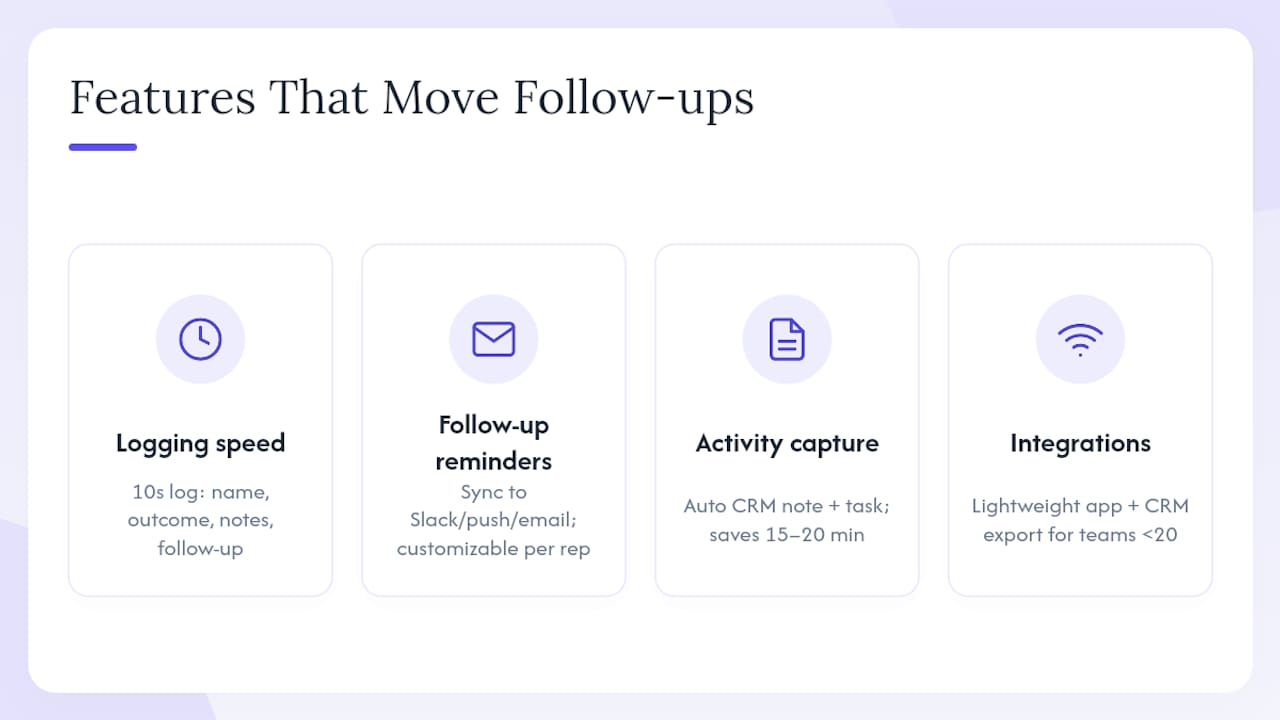
Call logging speed is the foundation. A 10-second log captures customer name, call outcome, notes, and a follow-up date in one action. When logging is that fast, reps do it between calls instead of batching it at end of day, which is when details get lost and follow-up dates get skipped.
Click-to-call shortens the dial-to-log loop. When the app initiates the call, it can pre-populate the contact record and prompt the outcome field the moment the call ends. On mobile, this matters more than on desktop because reps are moving between locations and do not have time to switch apps.
Automatic follow-up reminders are where most tools either win or lose. Syncing reminders into Slack, mobile push, or email keeps follow-ups in the rep's workflow and increases response speed. The best implementations let you customize reminder channels per rep and snooze a reminder without losing the task. Per-rep dashboards and leaderboards create accountability without micromanagement: a manager can see at a glance which reps have open callbacks past their due date.
Activity capture that reduces admin is the multiplier. Automating post-call summaries into a CRM note and a next-step task can cut 15–20 minutes of manual admin per call in workflows that still rely on reps writing their own notes. When that time goes away, reps make more calls.
Integration and data flows determine whether the tool fits your stack or fights it. For most outbound teams under 20 reps, a lightweight app with a clean CRM export beats a heavy CRM with a built-in dialer. The types of sales tracking tools that work best for cold-call teams are purpose-built for logging speed, not for managing contracts or support tickets.
Pro Tip: Set three to five default call outcomes (Connected, Left Voicemail, No Answer, Not Interested, Callback Requested) and a default follow-up template for each. Reps pick from a list instead of typing, which cuts log time and standardizes your reporting.
How to set up a callback workflow in six steps
This is a copyable setup sequence. Run it during your trial week.
- Define required call outcome fields. List the five outcomes your team actually uses. Anything beyond seven creates decision fatigue. Use standardized outcome types so reports are comparable across reps.
- Configure the quick-log template and click-to-call. Set default fields, required fields, and the follow-up date prompt so every completed call produces a reminder automatically.
- Set default reminder rules and channels. Decide: dashboard tile only, or dashboard plus mobile push? Set a default follow-up window (24 hours for hot leads, 48–72 hours for warm ones) and let reps override per contact.
- Train reps in a 30-minute session. Log three practice calls live. Show the reminder on the dashboard. Show the leaderboard. That is the whole training.
- Run a 30-day pilot. Track follow-up completion rate, time-to-first-follow-up, and contact rate weekly. Assign one manager to own the weekly review. A repeatable outbound follow-up playbook scales only when CRM sync and reminder delivery are automated from day one.
- Review and iterate. At day 30, compare contact rate and next-step conversion rate against the pre-pilot baseline. Adjust reminder timing, outcome fields, or channel settings based on what the data shows.
30-day pilot KPI checklist:
- Follow-up completion rate (target: a high proportion of due callbacks completed on time)
- Time-to-first-follow-up (target: under 24 hours for connected calls)
- Contact rate on callbacks (track week-over-week change)
- Per-rep activity counts (calls logged, follow-ups set, outcomes recorded)
What KPIs should you track, and what does the ROI look like?
| KPI | What it measures | Target |
|---|---|---|
| Follow-up completion rate | % of due callbacks completed on time | 80%+ |
| Time-to-first-follow-up | Hours between call and first follow-up action | Under 24 hours |
| Contact rate on callbacks | % of follow-up attempts that reach the prospect | Track week-over-week lift |
| Next-step conversion rate | % of callbacks that produce a next meeting or commitment | Baseline, then improve |
| Per-rep activity count | Calls logged, follow-ups set per rep per week | Establish baseline in week 1 |
Example ROI calculation: A rep making many calls per day and spending several minutes on post-call admin can save substantial time per week when logging drops to 10 seconds per call. Over 30 days, that is 12 hours per rep redirected to dialing. If even two of those extra hours per week produce one additional qualified conversation per day, the math on conversion is straightforward.
Automated reminders and per-rep dashboards are the most direct levers managers can use to improve follow-up completion without adding headcount.
Pro Tip: Use the leaderboard in your Monday morning huddle. Show the top three reps by follow-up completion rate, not just by calls made. That single habit shifts the team's definition of a good week from volume to execution.
Adoption tips and scaling advice for small teams
Getting reps to use a new tool consistently is harder than the setup. These practices work for teams of 3–10 reps.
- Sell the time savings first. Reps adopt tools that make their day easier. Show them the 10-second log in the first training session and let them feel the difference before you talk about dashboards or reporting.
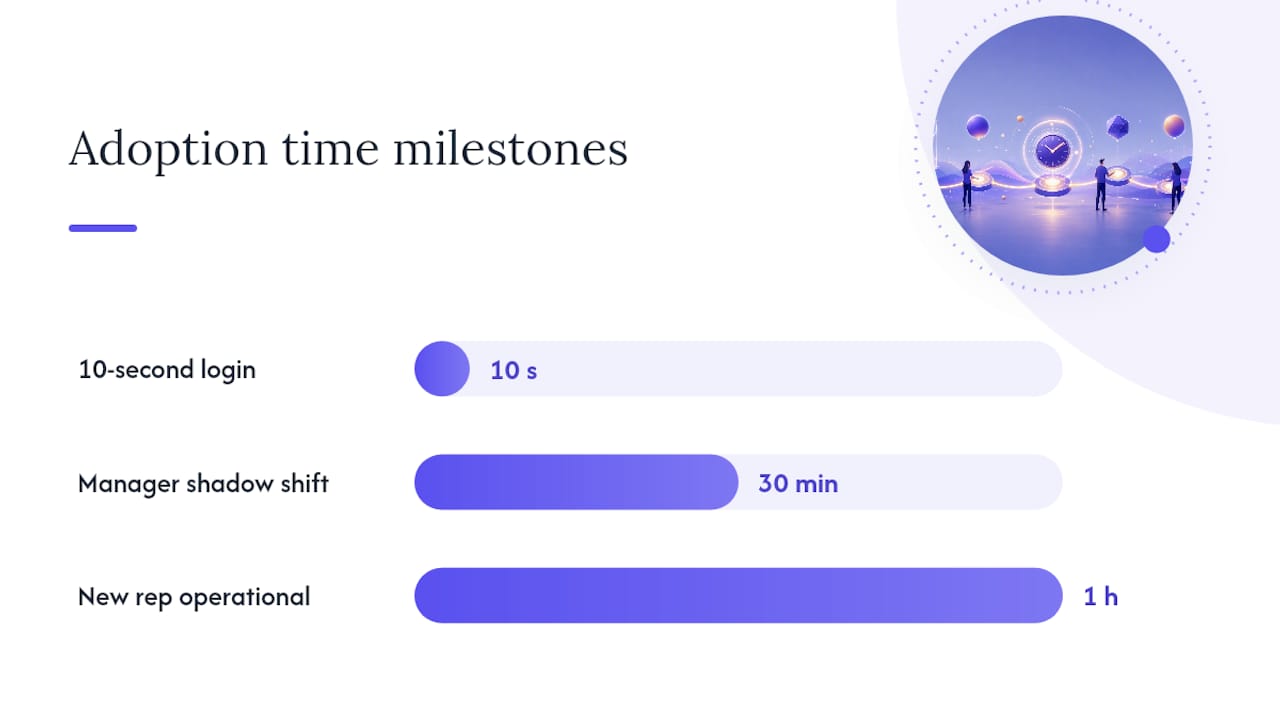
- Use a shadow shift. Have the manager sit with one rep for 30 minutes and watch them log calls live. You will find every friction point in the workflow within the first ten calls.
- Build reminders into existing routines. If the team has a morning huddle, open the dashboard's due-today reminder list as the first agenda item. Reminders that live inside existing habits get acted on.
- Add permissions and rules as the team grows. Start with a flat structure. Add manager-only reporting views and rep-level permission restrictions once the team hits 10+ reps or call volume exceeds what one manager can review manually.
If reps cannot adopt the tool quickly, data quality fails and the expected improvements in contact rate and forecasting will not materialize. Ease of use is not a nice feature. It is the adoption condition.
Pro Tip: Create a one-page quick reference card: how to log a call, how to set a follow-up, and how to check due reminders. Pin it in your team Slack channel. New reps should be fully operational within their first hour.
Why a lightweight approach wins for outbound teams
The conventional wisdom says outbound teams need a full CRM. After watching teams across home services, solar, insurance, and HVAC try to run cold-call workflows through enterprise CRMs, the pattern is consistent: the heavier the tool, the worse the logging compliance.
A CRM built for account management asks reps to fill in fields designed for deal stages, contract values, and multi-stakeholder relationships. A rep making 60 calls a day does not have that context on most calls, so they skip the log entirely. Within two weeks, the pipeline data is unreliable, coaching is guesswork, and the manager is back to asking reps verbally what happened on their calls.
Lightweight tools win because they match the actual workflow. Log fast, set the follow-up, act on the reminder. Dialedsales is built around exactly that loop: fast logs, automatic reminders, and per-rep dashboards that give managers real visibility without requiring reps to become CRM administrators.
The callback strategy guide makes the point clearly: reminder discipline and follow-up execution are what separate teams that close from teams that just dial.
What to test during your Dialedsales trial
Dialedsales gives outbound reps and sales managers a two-week free trial to run a real pilot, not just a demo. Credit card required at onboarding, cancel before the trial ends if it does not fit.
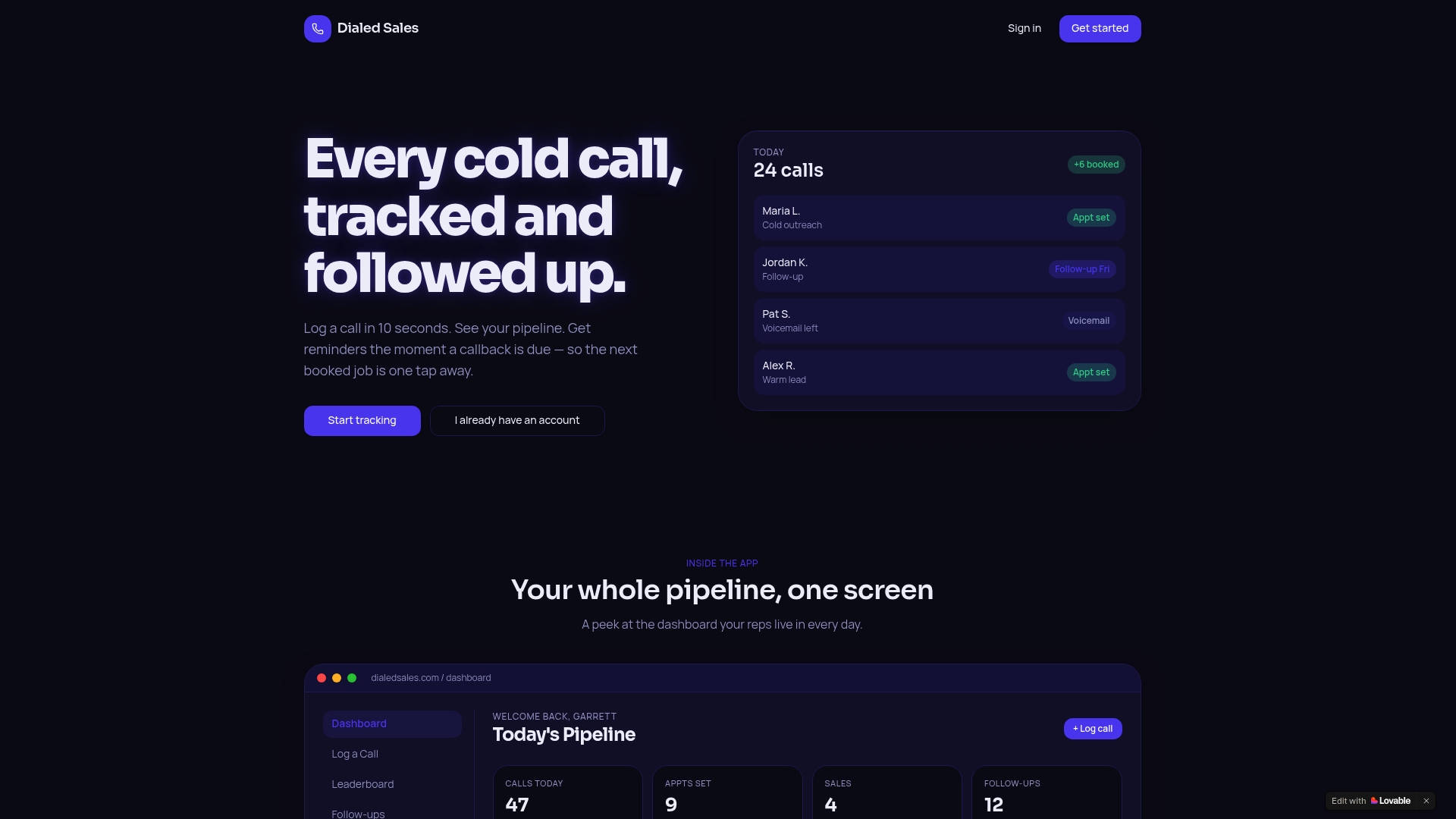
What to test in the first 72 hours: Log ten real calls using the quick-log screen and time yourself. Check that reminders surface on the dashboard and your mobile device. Export one activity report and confirm the data matches what your reps logged.
Full trial checklist: Test 10-second logging speed, automatic reminder delivery across channels, dashboard leaderboard visibility, mobile app parity on both iOS and Android, and CRM data export. Put two to three reps on the pilot, not the whole team. Measure follow-up completion rate and contact rate change at the end of week two.
Start your free trial at Dialedsales and run the 30-day pilot framework from this guide. The follow-up completion rate at day 30 will tell you whether the tool earns a full rollout.
Useful sources and further reading
- What Is a Sales Callback Strategy? Your 2026 Guide — framework for building a repeatable callback playbook
- How to Track Cold Call Outcomes Effectively in 2026 — step-by-step guide to configuring outcome fields and dashboards
- The Real Role of Call Reminders in Sales Success — behavioral case for reminder-driven follow-up discipline
- Sales Coaching Using Call Outcomes: 2026 Guide — how managers use outcome data for weekly coaching reviews