
For cold-call and field reps, the highest-impact setup is a lightweight call tracker paired with a CRM as your system of record. That combination handles fast logging, automatic follow-up reminders, and mobile access without burying you in admin work. Here is a quick map by team size:
- Solo or 1–5 reps: A mobile call tracker (like Dialedsales) plus a free or low-cost CRM covers everything you need.
- 5–25 reps: CRM plus a lightweight call tracker or auto-dialer. Add a sales engagement layer when cadence complexity grows.
- 25+ reps: CRM plus engagement platform plus conversation intelligence. Formal sales ops required.
The shortlist of tool types worth evaluating: CRM platforms, standalone call trackers, auto-dialers, sales engagement platforms, conversation-intelligence tools, and manual trackers (spreadsheets).
Table of Contents
- What are the main types of sales tracking tools?
- Which features actually matter for cold-call and field reps?
- How do you choose between a single tool and a full stack?
- What does a practical field-sales stack look like day-to-day?
- How do you roll out a tracking tool without killing adoption?
- When does Dialedsales make the most sense?
- Key Takeaways
- The tool that gets used beats the tool that does everything
- Dialedsales is built for the rep in the field, not the manager in the office
What are the main types of sales tracking tools?
Every category solves a different problem. Picking the wrong one wastes months of setup time.
Manual trackers and spreadsheets are a legitimate starting point for very small teams. Spreadsheets work until volume grows past roughly five active deals — after that, missing reminders and siloed context become a real revenue risk.
Standalone mobile and field-sales apps are built for reps who spend most of their day away from a desk. Speed of logging is the defining feature. The best ones let you record a call outcome in under 10 seconds, set a callback, and move on.

CRM platforms (Salesforce, HubSpot, Pipedrive, Zoho CRM) are the system of record for deals, contacts, and pipeline stages. Most B2B teams need a CRM as the foundation, then one or two complementary tools rather than a pile of siloed apps. CRMs are strong on data organization but often weak on mobile logging speed.
Sales engagement platforms manage outreach cadences — sequences of calls, emails, and texts. They shine for high-volume SDR teams but add overhead that solo field reps rarely need.
Auto-dialers and call trackers automate dialing and log call outcomes automatically. Power dialers work well for inside sales teams running 80+ calls a day. For field reps making 15–30 targeted calls, a lightweight tracker beats a full dialer on simplicity.
Conversation-intelligence tools (like Gong) record, transcribe, and analyze calls. Genuinely useful for coaching and forecasting at scale, but priced and scoped for enterprise teams.
BI, forecasting, and CPQ tools sit at the top of the stack. They consume data from your CRM and engagement layer to produce pipeline forecasts and configure quotes. Relevant only once you have clean upstream data.
Pro Tip: Stop using a spreadsheet the moment you have more than five active deals or more than one rep sharing pipeline data. The missing-reminder problem alone costs more deals than the upgrade costs in time.
Which features actually matter for cold-call and field reps?
Most feature lists are written for RevOps managers, not the rep in a parking lot between appointments. Here is what moves the needle day-to-day:
- Call logging under 10 seconds. If it takes longer, reps skip it. Period.
- Next-action reminders. Auto-surfacing a callback when it is due is the single biggest driver of follow-up discipline.
- Outcome and status field. One tap to mark "left voicemail," "interested," or "not now" keeps your pipeline honest.
- Mobile-first UX. A desktop-only tool is a non-starter for field teams.
- Offline logging. Cell coverage disappears in industrial zones and rural territories. Your tracker needs to queue entries and sync later.
- Call-recording consent controls. In the U.S., one-party and two-party consent rules vary by state, and TCPA compliance applies to certain outbound campaigns. Your tool should make consent management easy, not an afterthought.
- CRM integration. Logged calls should sync to your CRM automatically. Manual re-entry is where data quality breaks down.
- Quick pipeline view. A single screen showing who is due for a callback today is worth more than a 12-tab dashboard.
- Lightweight reporting. Logging rate, callback completion, and close rate. That is the core set for most field teams.
Stat to know: Only a small portion of sellers consistently hit quota. Better activity tracking is one of the few levers a rep controls directly.
One feature trap to avoid: mandatory fields. Every extra required field at call-log time is friction that kills adoption. Start with three fields maximum — contact name, outcome, and follow-up date — and add fields only when you have a specific reporting need.
How do you choose between a single tool and a full stack?
The honest answer depends on two variables: team size and how complex your sales motion is.
| Team size | Sales motion | Recommended approach |
|---|---|---|
| 1–5 reps | Simple outbound, single channel | Mobile tracker + free CRM |
| 5–25 reps | Multi-channel outbound | CRM + lightweight call tracker |
| 25+ reps | Territory-driven, complex | CRM + engagement layer + conversation intelligence |
Before you sign anything, ask vendors these questions:
- How many taps does it take to log a call on mobile?
- Does the app work offline and sync when reconnected?
- What CRM connectors are native vs. requiring a third-party sync tool?
- How does the platform handle call-recording consent and TCPA flags?
- Who owns the data if we cancel, and what export formats are available?
- What is the admin overhead per week for a team of our size?
- Is pricing per user per month, and is there a free trial or pilot tier?
Red flags in demos: a tool that requires a three-step integration before you can log your first call, no mobile shortcut for logging, or a sales rep who cannot show you the mobile app live.
Typical pilot timelines run two to four weeks for a 5–10 rep cohort. Most per-user SaaS tools for this segment start between $10–$50 per user per month, with free tiers available from several CRM providers.
What does a practical field-sales stack look like day-to-day?
Three stacks, matched to real team situations:
Solo or early-stage: Dialedsales for call logging and callback reminders, paired with HubSpot's free CRM for contact and deal records. Total admin time: under 10 minutes a day.
SMB outbound team (5–25 reps): A mid-market CRM like Pipedrive or Zoho CRM as the system of record, with Dialedsales handling fast mobile logging and follow-up queuing. Trackers that sync with CRMs show better adoption and cleaner data than standalone spreadsheets.
Larger teams (25+): CRM plus a sales engagement platform for cadence management, plus a conversation-intelligence layer for coaching. AI-driven analytics can surface deal risk signals that manual review misses entirely.
A sample daily flow for a field rep:
- 7:45 AM: Open the app, review callbacks due today. Three names surface automatically.
- Between appointments: Log each call in 10 seconds — name, outcome, next date.
- End of day: Pipeline view shows 12 open deals, four callbacks overdue. Reschedule two, close one.
Data hygiene rules that actually hold up in the field: automate every capture you can, keep required fields to a minimum, and never ask a rep to enter data that the system can pull from the phone log itself.
How do you roll out a tracking tool without killing adoption?
- Select a pilot cohort of 5–10 reps who are motivated and representative of your typical field motion. Week one.
- Configure core fields only — contact name, call outcome, follow-up date. Resist adding more. Week one.
- Run a 30-minute training session focused on the 10-second logging rule. Show the mobile flow live. Week one.
- Measure for two to four weeks: logging rate (percentage of calls logged same day), callback completion rate, and follow-up-to-meeting conversion.
- Review and decide: if logging rate is above 80% and reps report less mental overhead, expand rollout. If not, diagnose friction before scaling.
KPIs that matter post-rollout: logging rate, callback completion rate, follow-up-to-meeting conversion, pipeline velocity, and time saved per rep. Tracking these consistently is what separates a tool that changes behavior from one that collects dust.
Pro Tip: Embed a one-week logging rate metric into rep scorecards during the pilot. Reps who hit 80%+ logging in week one almost always sustain it. Those who do not usually have a friction problem, not a motivation problem — fix the workflow, not the person.
When does Dialedsales make the most sense?
Dialedsales fits best when speed and simplicity are the priority: mobile-first field reps, high-volume cold callers, and small-to-mid teams that need callback reminders without the overhead of a full sales engagement platform. Log a call in 10 seconds, get a reminder the moment a callback is due, and see your whole pipeline on one screen. For teams that have tried CRM-only logging and found reps skipping it, Dialedsales solves the friction problem directly.
Pilot next steps: run a 30-day trial with 5–10 reps, measure logging rate and callback completion rate at the two-week mark, and compare close rate trend before and after. Avoid adding more tools during the pilot — the goal is to prove that simple, fast logging changes behavior.
Key Takeaways
The most effective setup for cold-call and field reps is a lightweight call tracker paired with a CRM, keeping logging under 10 seconds and follow-ups automatic.
| Point | Details |
|---|---|
| Core setup | A mobile call tracker plus a CRM covers most cold-call and field-sales needs. |
| Must-have features | Sub-10-second logging, callback reminders, outcome field, offline support, and CRM sync. |
| Team-size rule | Solo to 5 reps: tracker plus free CRM. 5–25: add a call tracker to your CRM. 25+: add engagement and conversation-intelligence layers. |
| Onboarding quick win | Limit required fields to three at launch; measure logging rate in week one before adding complexity. |
| Dialedsales fit | Dialedsales delivers 10-second call logging, auto-surfaced callback reminders, and a pipeline view built for field and cold-call reps. |
The tool that gets used beats the tool that does everything
The conversation about sales tracking almost always drifts toward features. More fields, deeper analytics, AI scoring. What gets lost is the adoption question: will a rep actually log a call from a parking lot at 4 PM on a Friday?
Manual deal tracking is genuinely expensive. In complex B2B environments, reps can spend 12–15 hours per week reconstructing deal context from scattered notes. That is not a productivity problem — it is a system design problem. The fix is not discipline; it is removing friction from the point of capture.
The teams that get the most from tracking treat it as shared infrastructure, not a surveillance layer. When a manager can see deal state and next steps without asking the rep to rewrite their week, the tool is working. When reps feel like they are logging for the manager's dashboard rather than their own follow-up queue, adoption collapses. Design the system for the rep first. The manager's visibility is a byproduct, not the goal.
Dialedsales is built for the rep in the field, not the manager in the office
Cold-call reps and field teams do not need another platform that takes 10 minutes to update. Dialedsales gives you a 10-second call log, callback reminders that surface automatically when they are due, and a pipeline view that shows exactly where every deal stands — all from your phone.
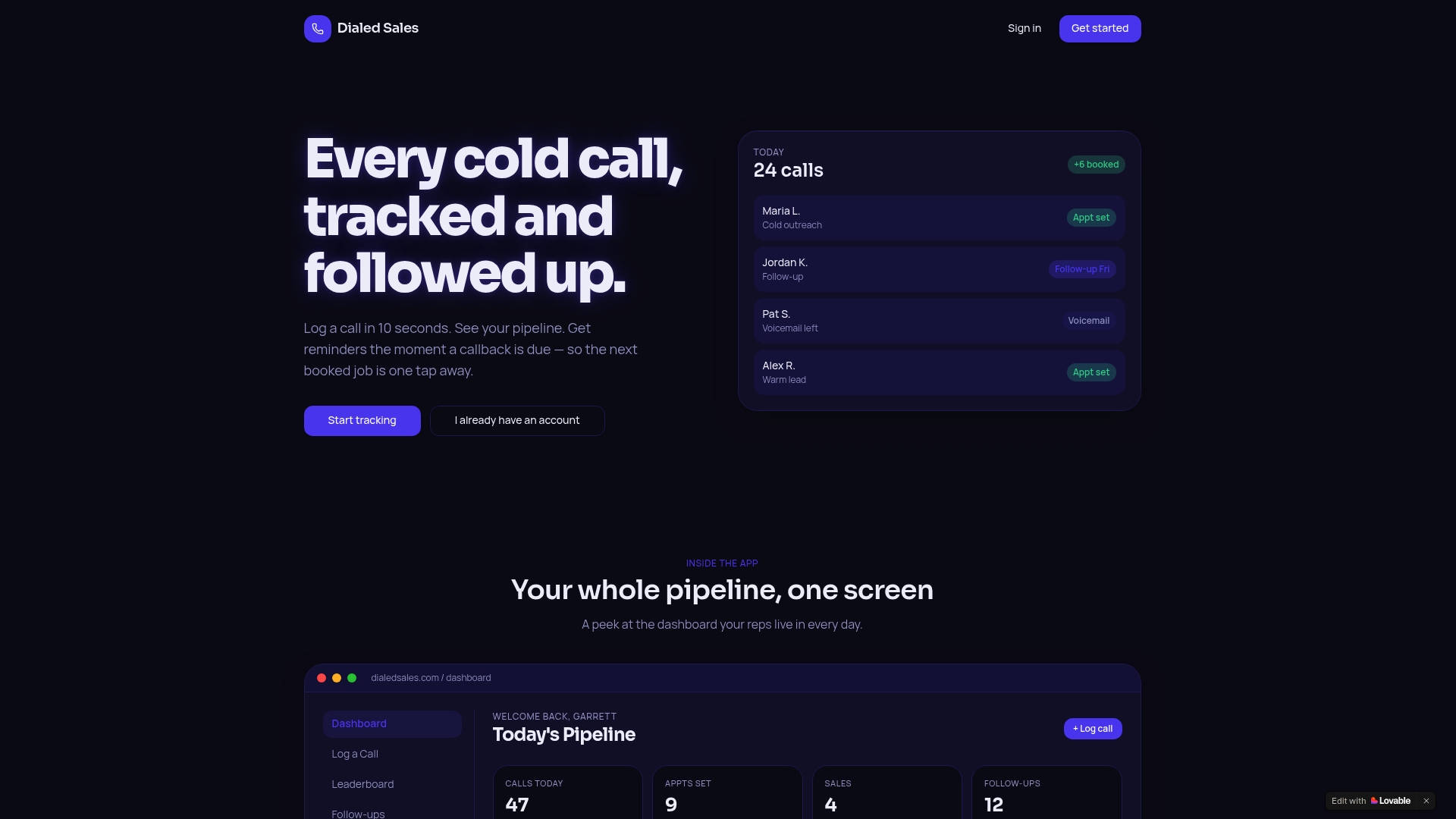
The workflow is direct: log the call with a name, outcome, and note; set a follow-up date; watch your callback queue manage itself. No complex setup, no mandatory integrations before your first log. For a 30-day pilot with 5–10 reps, the two metrics to watch are logging rate and callback completion rate. Both tend to move fast once the friction is gone.
Start tracking calls with Dialedsales and see the difference a frictionless log makes to your close rate inside the first two weeks.