
Before you drive to your first visit, run these six steps. They take 10–15 minutes and they're the difference between a meeting that moves the deal and one that burns an hour of everyone's time.
- Confirm the appointment the morning of, by text or email.
- Set a single, written objective — something specific, like "Secure a trial start date with the procurement lead by addressing their vendor-approval concern."
- Review CRM notes from every prior interaction with this account.
- Build a tailored value hypothesis — one sentence connecting their known pain to your solution.
- Pack materials and test your demo tech the night before, not in the parking lot.
- Schedule your post-visit follow-up slot before you leave the office.
That's the core field sales workflow checklist. The rest of this guide explains how to execute each step, what to do during the visit, and how to close the loop afterward so nothing falls through.
Key Takeaways
A structured field sales workflow checklist, run consistently before and after every visit, is the single most reliable way to raise productive visit rate and keep pipeline data accurate.
| Point | Details |
|---|---|
| Pre-visit prep takes 10–15 minutes | Confirm appointment, write one objective, review CRM notes, prep value hypothesis, test tech, set follow-up slot. |
| Time-box every visit | Allocate 15–20 minutes to discovery; reps should speak no more than 40% of the time in that phase. |
| Log within 30–60 minutes | Capture outcome, next action, owner, and date before memory fades; send follow-up email within 24 hours. |
| Track productive visit rate | A completion rate below 75% signals a route problem; productive visit rate separates busy reps from effective ones. |
| Dialedsales closes the loop | Log outcomes in under 10 seconds, get automatic follow-up reminders, and give managers live pipeline visibility. |
Table of Contents
- Why does preparation actually move your close rate?
- What should your pre-visit checklist cover?
- How should you plan your route and daily schedule?
- What does a great on-site visit look like, minute by minute?
- What should you do in the 30 minutes after a visit?
- Templates you can use today
- How Garrett runs a full visit cycle in under 30 minutes of admin
- Which visit metrics actually matter?
- What mistakes kill field visit ROI?
- What a real field day looks like when the checklist is running
- Dialedsales keeps the checklist from falling apart
- Sources
Why does preparation actually move your close rate?
A structured pre-visit routine does two things most reps underestimate: it raises the percentage of visits that produce a concrete next step, and it compresses the time between visit and follow-up. Both of those feed directly into pipeline velocity.
According to Fieldpie's field sales activity management guide, teams that prioritize visit quality over raw visit counts and track planned versus completed visits consistently outperform those that don't. A completion rate below a certain threshold is a signal that your route or daily capacity is unrealistic, not that your reps are lazy.
Pro Tip: The single biggest uplift most reps can make is logging visit notes and sending the follow-up email within 24 hours. Deals stall not because the meeting went badly, but because the next step was never confirmed in writing.
What should your pre-visit checklist cover?
Ocasta's field sales call planning checklist recommends blocking some time before and after each visit. Here's how to use that pre-visit window:
- Confirm the appointment. A quick text or email the morning of cuts no-shows and signals professionalism.
- Define your objective and success criteria. Write it in one sentence. "Get verbal commitment to a 30-day pilot" is an objective. "Have a good meeting" is not.
- Map the stakeholders. Who will be in the room? Who holds budget? Who can block the deal?
- Review account history and previous notes. Check your CRM for the last three interactions, any open issues, and prior commitments you made.
- Prepare your value hypothesis. Connect one specific pain point you know they have to one specific outcome your product delivers. Bring a proof point — a case study, a number, a reference.
- Pack materials and test your tech. Demo on your laptop? Check the battery and the Wi-Fi backup. Leaving a printed one-pager? Confirm it's in your bag.
- Check site rules or compliance requirements. Some facilities require sign-in, NDAs, or safety gear. Find out before you arrive.
- Set your CRM follow-up template and calendar slot. Open the follow-up task before you leave so you're not starting from scratch after the visit.
Discovery questions to carry into every meeting
Strong discovery separates reps who present from reps who close. Carry these six into every visit:
- "What's the biggest friction point in how you handle [relevant process] today?"
- "What would need to be true for you to move forward in the next 30 days?"
- "Who else needs to be involved in a decision like this?"
- "What happened the last time you tried to solve this?"
- "What does success look like six months from now?"
- "What's the cost of not changing anything?"
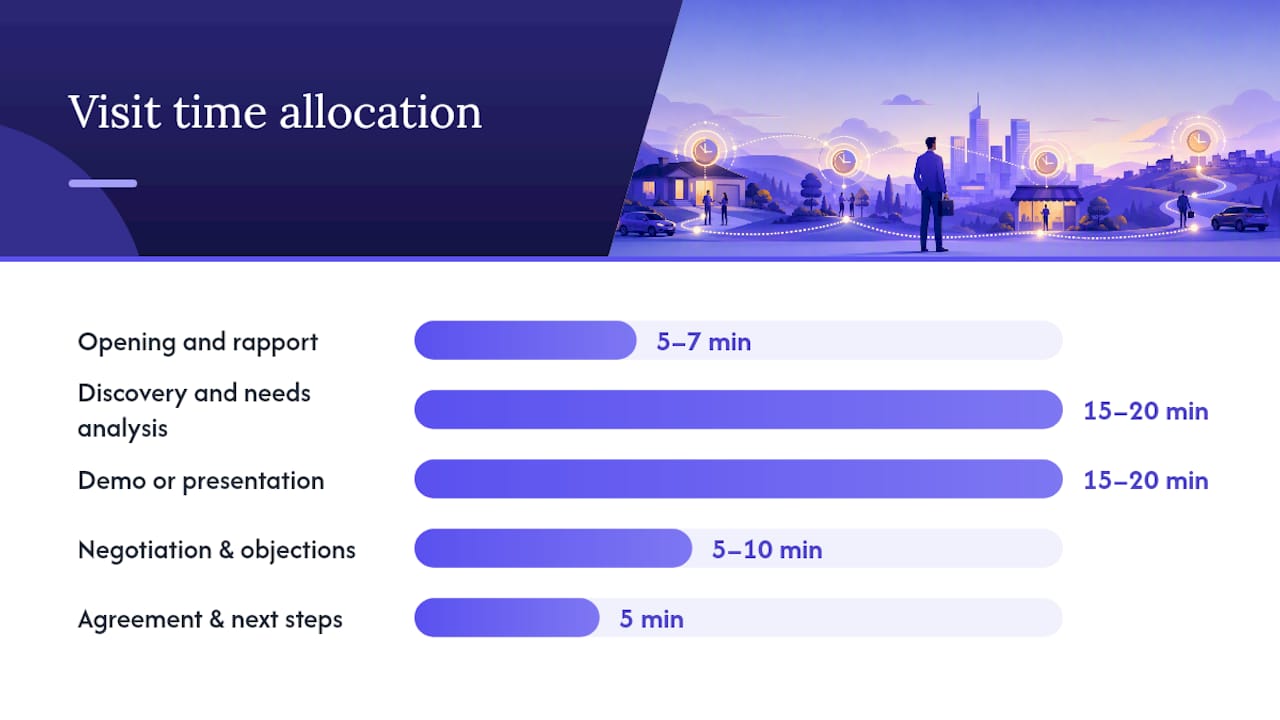
How to budget time in a 45–60 minute visit
| Visit phase | Recommended time |
|---|---|
| Opening and rapport | 5–7 minutes |
| Discovery and needs analysis | 15–20 minutes |
| Demo or presentation | 15–20 minutes |
| Negotiation and objection handling | 5–10 minutes |
| Agreement and confirmed next steps | 5 minutes |
Pro Tip: Before you leave the office, lock three things: the objective in writing, the follow-up task open in your CRM, and the demo loaded on your device. Those three habits cut post-visit logging time in half.
How should you plan your route and daily schedule?
Geography-first scheduling is one of the highest-leverage habits in field sales management. Reps who sequence visits by convenience rather than territory density waste 30–45 minutes of drive time per day, which compounds to hours per week.
Start with account prioritization:
- A accounts (highest revenue potential or renewal risk): visit monthly or more.
- B accounts (moderate potential): visit quarterly, with phone or email touchpoints between.
- C accounts (low potential): route in only when geographically efficient.
Cluster visits by geography and decision-window. A "decision-window" is the period when a contact is actually available and in a buying mindset — don't schedule a CFO at 8 AM on a Monday if you know they're in budget reviews.
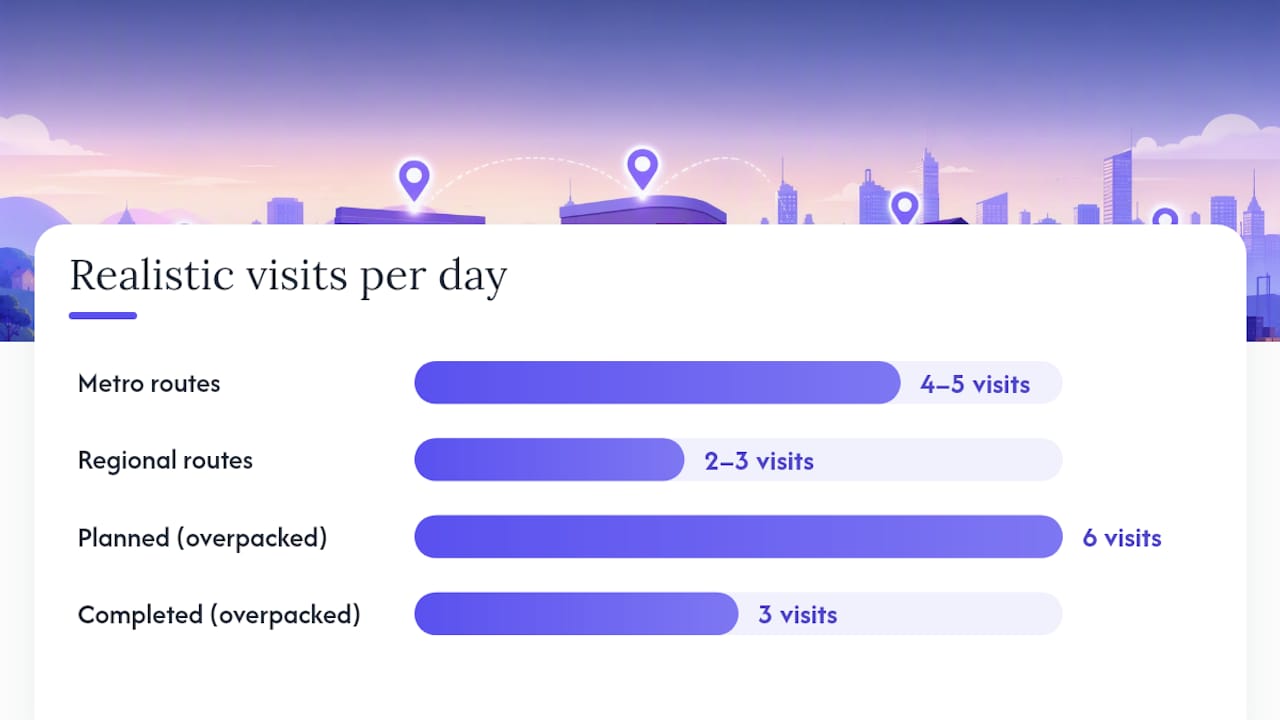
Realistic daily capacity depends on average visit length plus travel plus buffer. For a rep covering a metro area, four to five visits per day is achievable. For regional routes with 30–45 minute drives between stops, two to three is more realistic. Padding every day with six visits and completing three is a planning problem, not a hustle problem.
SalesOS's territory management guide recommends making territory rules explicit and prioritized, with assignment methods that include manual overrides, bulk CSV upload, round-robin, and capacity-based routing. Managers building or rebuilding territories should also model multiple variants and run impact analysis before activating changes, per the FoundryOps territory management guide.
Pro Tip: A quick test for a realistic day plan: add up all visit times plus estimated drive times plus 15-minute buffers. If the total exceeds six hours, cut a visit. A rushed final meeting is worse than no meeting.
What does a great on-site visit look like, minute by minute?
Open with a one-line agenda. Something like: "I want to spend about 15 minutes understanding where things stand for you, show you what we've done for similar teams, and then figure out if there's a fit worth exploring. Sound good?" That framing sets expectations and signals you're not there to pitch for 45 minutes straight.
Here's the minute-by-minute flow:
- Minutes 0–7 (Opening): Small talk, confirm the agenda, verify who's in the room and their roles.
- Minutes 7–25 (Discovery): Ask your prepared questions. Listen more than you talk. A useful target: the rep speaks no more than 40% of the time during discovery.
- Minutes 25–45 (Demo or presentation): Anchor every feature to a pain point the prospect just named. Skip anything they didn't mention.
- Minutes 45–55 (Negotiation): Handle objections with questions, not defenses. "What would need to change for that concern to go away?" is more useful than a rebuttal.
- Minutes 55–60 (Agreement and next steps): Name the next step, assign an owner, and set a date. Don't leave without both.
Closing checklist before you walk out
- Named next action confirmed with the prospect ("I'll send the proposal by Thursday; you'll review by Friday")
- Owner assigned for every action item
- Date set for the next touchpoint
- Key objections noted in your phone or notebook
- CRM task opened or voice-noted for logging within the hour
Pro Tip: The listening ratio matters more than most reps think. Slow down and ask a follow-up question instead of filling silence.
What should you do in the 30 minutes after a visit?
Log notes and next actions within 30–60 minutes of leaving the site. Memory degrades fast, and the details that matter most — the objection the CFO raised, the competitor they mentioned, the date they said they'd have budget — are the first things to blur.
Exact CRM fields to populate after every visit:
- Outcome: Closed, advanced, stalled, or lost — pick one.
- Stakeholders added: Any new contacts you met.
- Next action owner: Who is doing what.
- Proposed date: When the next touchpoint happens.
- Attachments: Photos of whiteboards, signed forms, or leave-behinds.
Send your follow-up email within 24 hours. Here's a template you can copy:
Subject: Next steps from our meeting today — [Company Name]
Hi [First Name],
Thanks for the time today. Based on our conversation, the next step is [specific action] by [date]. I'll [your commitment] and you'll [their commitment].
Let me know if anything changes on your end.
[Your name]
Set a reminder in your CRM or activity tracker for the follow-up date. If the prospect doesn't respond by that date, the reminder surfaces it automatically so nothing gets dropped.
Pro Tip: Write your CRM notes in the car before you start driving. Two minutes of voice-to-text or typed shorthand right after the meeting captures more than 20 minutes of reconstruction that evening.
Templates you can use today
Visit agenda template
Account: [Name] | Date: [Date] | Rep: [Name]
- 0–5 min: Introductions and agenda confirmation
- 5–20 min: Discovery (use prepared questions)
- 20–40 min: Demo or solution walkthrough
- 40–55 min: Objections and negotiation
- 55–60 min: Confirmed next steps
Discussion guide (6 discovery prompts + stakeholder map)
- What's your biggest friction point with [relevant process] today?
- What would need to be true to move forward in the next 30 days?
- Who else is involved in this decision?
- What happened the last time you tried to solve this?
- What does success look like in six months?
- What's the cost of not changing anything?
Stakeholder map: Decision-maker / Budget holder / Technical evaluator / Champion
One-page leave-behind
- Value summary: [One sentence connecting their pain to your outcome]
- Proof point: [Case study or metric]
- Next steps: [Specific action + date]
- Contact: [Rep name, phone, email]
Follow-up email (ready to copy)
Subject: Following up — [Company Name] next steps
Hi [First Name], quick note to confirm what we agreed: [next action] by [date]. I'll [your task]. Reply if anything shifts.
[Your name]
Save these templates in your mobile CRM as saved notes or activity templates so you can pull them up on-site without hunting through email.
How Garrett runs a full visit cycle in under 30 minutes of admin
Garrett's routine strips the checklist down to what actually gets done in the field, not what looks good in a training deck.
- Morning prep (10–12 minutes): Pull up the day's accounts in the CRM, read the last two notes for each, write one objective sentence per visit, confirm appointments by text.
- On-site shorthand: During the meeting, Garrett keeps a notes app open and types three things: the key objection, the agreed next step, and the date. That's it. Full notes come later.
- Post-visit logging (15–20 minutes total across all visits): In the car after each meeting, he voice-notes the outcome and any new stakeholders. At the end of the day, he opens the CRM, fills in the structured fields from his voice notes, and sends follow-up emails from a saved template.
- Evening pipeline check (5 minutes): Scan the dashboard for any overdue follow-ups or stalled deals that need a nudge.
Field priority list — what must be captured vs. optional:
- Must capture: Outcome, next action, next action date, key objection
- Good to have: New stakeholders, competitive mentions, budget signals
- Optional: Verbatim quotes, detailed meeting recap
Pro Tip: Using a mobile activity tracker like Dialedsales compresses logging to under 10 seconds per call or visit. Log the outcome, set the follow-up date, and the app surfaces it on your dashboard when it's due. That's the daily workflow that keeps the pipeline clean without the admin overhead.
Which visit metrics actually matter?
Track these five KPIs for field visits, per Fieldpie's best practices:
- Planned vs. completed visits: The ratio tells you whether your route plan is realistic.
- Productive visit rate: Percentage of visits that produce a concrete next step (demo booked, proposal requested, trial started).
- Follow-up completion within 24 hours: Tracks discipline, not just activity.
- Orders or revenue per visit: The output metric that ties activity to quota.
- Pipeline advances per visit: How many deals moved a stage as a result of the visit.
Reporting cadence:
- Reps: Review your own activity daily. Five minutes at end of day.
- Managers: Weekly review of planned vs. completed, productive visit rate, and follow-up completion. Use a pipeline review checklist to structure it.
- Quarterly: Validate territory coverage and rebalance account assignments if completion rates are consistently off.
According to Fieldpie, a completion rate below roughly 75% typically signals a route or capacity problem, not a rep performance problem. Fix the plan before you address the person.
Pro Tip: Productive visit rate is the one metric that separates a busy rep from an effective one. Volume without quality is just mileage.
What mistakes kill field visit ROI?
Common rep mistakes:
- Showing up without a written objective
- Spending more than 40% of the meeting talking
- Leaving without a confirmed next step and date
- Logging CRM notes two days later (or not at all)
- Chasing C accounts because they're easy, not because they're valuable
Manager red flags in visit data:
- Completion rate below 75% for more than two consecutive weeks
- Productive visit rate under 50% across the team
- Follow-up emails sent more than 48 hours after visits
- Same accounts visited repeatedly with no stage movement
Quick remediation steps:
- For low completion rates: rebuild the daily route plan with realistic travel time.
- For low productive visit rate: shadow one visit per rep per month and debrief on discovery quality.
- For late follow-ups: set a team standard (24-hour rule) and track it as a KPI, not a suggestion.
A strict, short playbook with clear exit criteria for each stage prevents the optimistic bias that inflates pipeline and slows close time, as Etavrian's field sales playbook guide points out.
What a real field day looks like when the checklist is running
The morning starts at 7:45 AM. Three visits on the calendar, all clustered within a 12-mile radius. The first account is an A account with a renewal coming up in six weeks, so it gets the first slot when energy is highest. Objective written: "Confirm renewal terms and get verbal yes before the formal proposal."
The second visit is a new prospect. The prep note from the CRM says the last rep who called them got stonewalled on price. So the discovery questions are built around value, not features. The meeting goes 52 minutes. The prospect asks for a proposal. That's a pipeline advance.
The third visit is a quick check-in with a B account. Fifteen minutes, no demo, just relationship maintenance and a leave-behind. In the car afterward, voice notes captured in 90 seconds.
By 4:30 PM, all three CRM records are updated, two follow-up emails are sent, and the pipeline dashboard shows one new advance. The habit that made the biggest difference that day wasn't the discovery questions or the leave-behind. It was writing the objective before leaving the office. Every decision in the meeting flowed from that one sentence.
Dialedsales keeps the checklist from falling apart
The checklist works on paper. Where most reps lose it is in the gap between the visit and the CRM — that 30-minute window where notes get vague, follow-ups get delayed, and deals quietly stall.
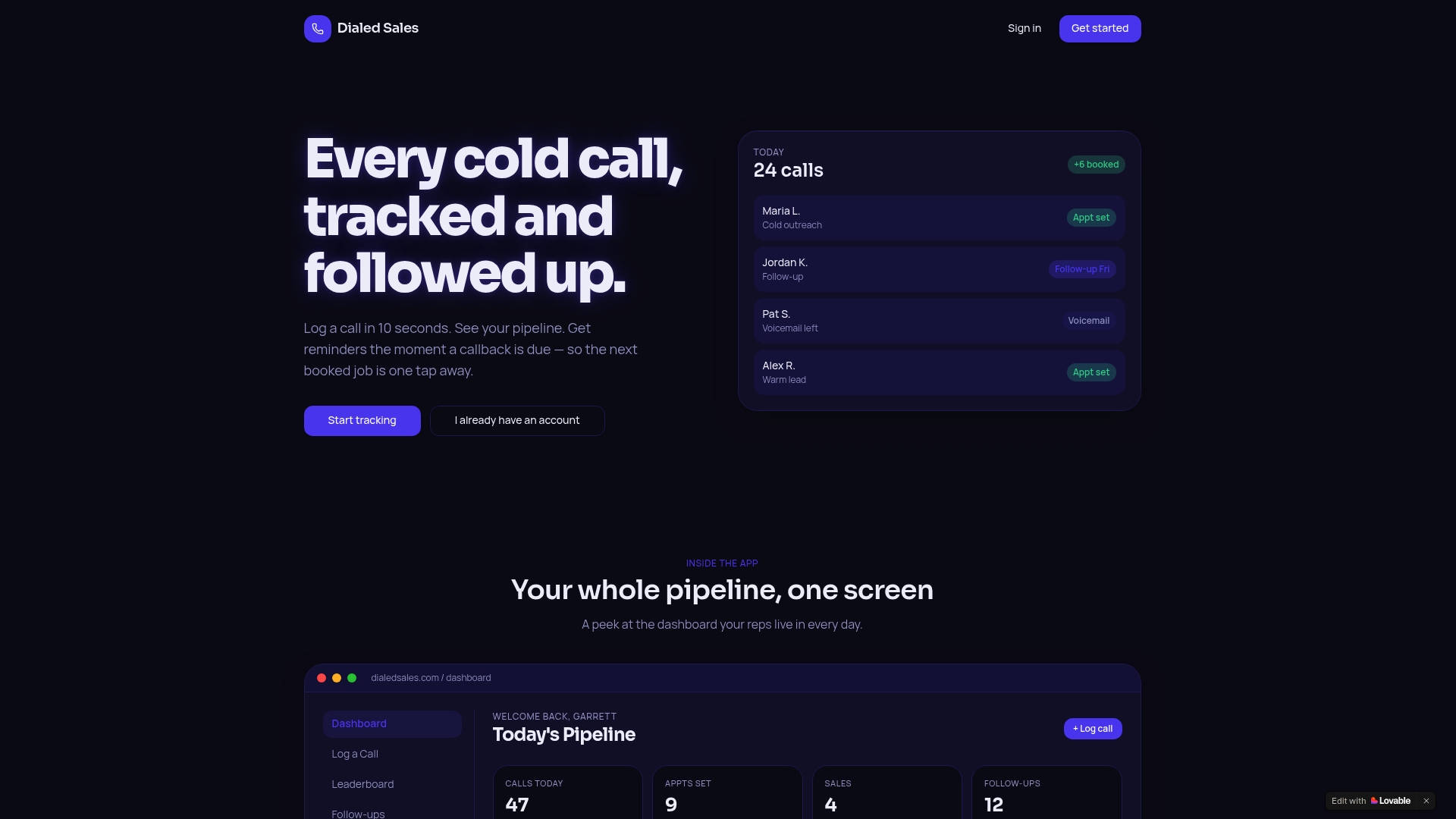
Dialedsales is built for exactly that gap. Log a visit outcome in under 10 seconds, set a follow-up date that auto-surfaces on your dashboard when it's due, and track every outcome so your close rate is visible, not guessable. The built-in AI assistant drafts follow-up messages from your logged notes, so the 24-hour email goes out even on a packed day. Managers get a live leaderboard and per-rep activity stats without chasing anyone for a report.
It runs on iPhone, Android, and desktop. No complex setup, no long onboarding. Start with one rep or one team, see the difference in your pipeline, and roll it out from there. Try Dialedsales free and run your first visit cycle with the checklist today.
Sources
- Territory management for Salesforce — FoundryOps guide
- Field sales activity management: KPIs and best practices — Fieldpie
- Field sales call planning checklist (B2B visits) — Ocasta