
Tracking dials converts raw calling activity into measurable outcomes: conversations, meetings, and closed revenue. Without it, you're managing effort, not results. Personal KPI tracking centers on three fundamentals — dials, contacts, and conversions — and teams that log all three consistently turn prospecting blocks into a predictable pipeline instead of a daily guessing game. Start your pilot today: commit to logging every dial with outcome and follow-up date for 30 days straight.
- Log every dial with customer name, outcome, and a follow-up date from day one.
- Track connects separately from raw dials — that gap is where coaching lives.
- Review the numbers weekly, not monthly, so you can adjust cadence before a bad week becomes a bad quarter.
Pro Tip: Set a non-negotiable minimum of three required fields per log entry: outcome, contact name, and next follow-up date. Anything less and the data becomes too thin to coach from.
Table of Contents
- What is dial tracking and how does it actually work?
- Which call metrics should every sales leader actually track?
- How tracking dials changes your team's performance
- How to implement dial tracking for your team this month
- Pitfalls, SEO risks, and U.S. legal considerations
- A daily workflow that keeps your call data clean
- Key Takeaways
- The case for keeping it simple
- Dialedsales: built for teams that need to move fast
What is dial tracking and how does it actually work?
Call tracking assigns unique phone numbers to specific marketing channels or campaigns, then records call-level data: caller location, timestamp, duration, and campaign source. For inbound traffic, dynamic number insertion (DNI) swaps the number displayed on a webpage at load time based on the visitor's traffic source, so a paid-search visitor sees a different number than an organic one. That swap happens client-side and does not alter your listed business number in directories, which protects NAP (name, address, phone) consistency for local SEO.
For outbound sales teams, the mechanism is simpler: outbound call tracking logs each dial as a data point tied to a rep, a contact list, a campaign, and an outcome. A complete call log captures the rep's name, the contact's name and company, call timestamp, duration, disposition (Wrong Number, No Answer, Follow-up Scheduled, Pitched, Closed), and any notes. When that record pushes into your CRM, it becomes a pipeline event — not just a tally mark on a whiteboard.
| Log Field | What It Reveals |
|---|---|
| Rep name | Per-rep activity and conversion rates |
| Outcome / disposition | Funnel leak points and coaching targets |
| Duration | Talk time vs. hang-up patterns |
| Follow-up date | Pipeline hygiene and callback compliance |
| Campaign / list tag | List quality and sequence effectiveness |
Which call metrics should every sales leader actually track?
Dial count is the most commonly reported metric and the least useful one in isolation. Connected conversations predict pipeline far better than raw volume because they represent live, two-way exchanges — the only kind that move a deal forward. A rep logging 120 dials a day with a 3% connect rate is doing less real work than one logging 60 dials at 12%.
The metrics worth tracking, split by leading and lagging:
Leading indicators (predict future pipeline):
- Dials per day: a volume floor, not a goal. Typical outbound reps run a moderate volume of dials per day depending on industry and list quality.
- Connect rate: dials that reach a live person. Cold outbound averages vary, but a consistently low connect rate usually signals a list quality or timing problem.
- Conversation rate: of connects, how many become a real two-way exchange lasting more than 30 seconds.
- Follow-up rate: percentage of calls that generate a scheduled next step.
Lagging indicators (confirm results):
- Meetings set per day/week
- Conversion-to-opportunity rate
- Closed deals attributed to outbound calls
Per-rep connection and conversation rate reporting reveals who is actually building pipeline versus who is inflating activity numbers. Leaderboards that surface connected conversations instead of raw dials change coaching decisions immediately.
| Metric | Leading / Lagging | What a Low Value Signals |
|---|---|---|
| Dials per day | Leading | Low effort or poor time blocking |
| Connect rate | Leading | Stale list or wrong call window |
| Conversation rate | Leading | Weak opener or wrong persona |
| Meetings set | Lagging | Pitch or follow-up breakdown |
| Closed deals | Lagging | Qualification or closing gap |
How tracking dials changes your team's performance
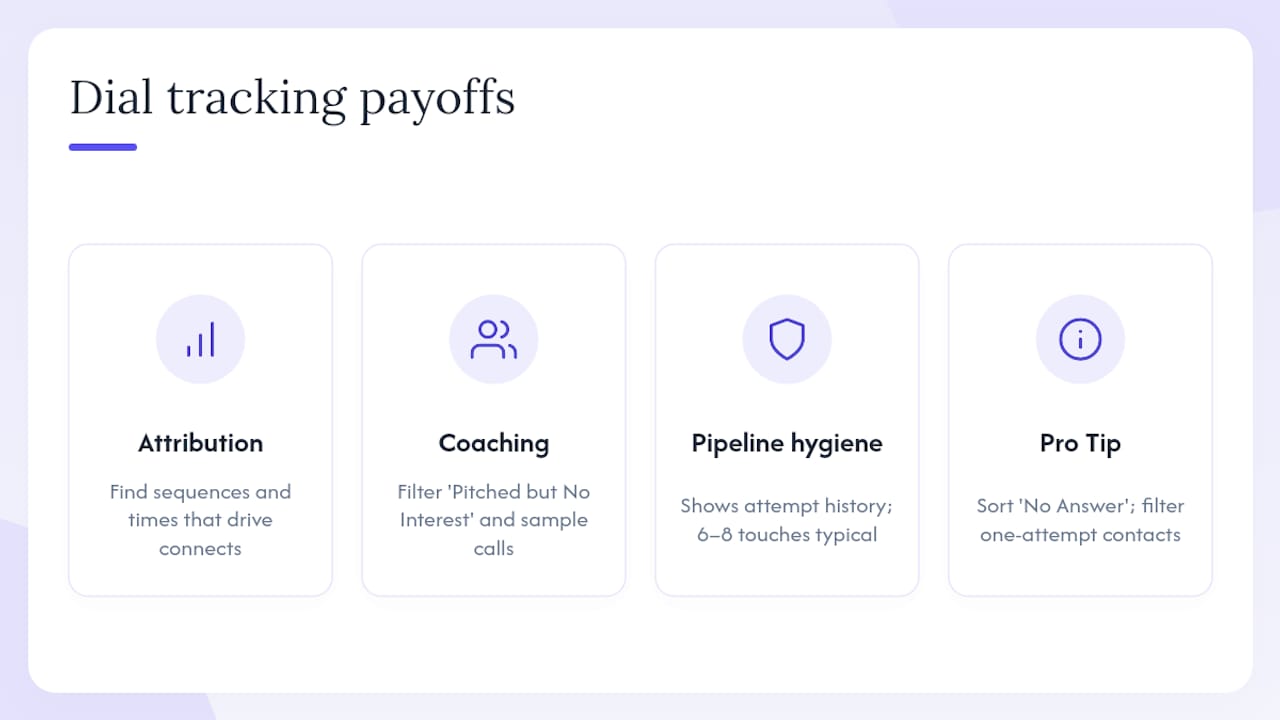
Attribution is the first payoff. When every dial carries a campaign and list tag, you can see which sequences drive conversations and which burn through contacts without producing anything. A team that discovers its Tuesday afternoon block generates twice the connect rate of Monday morning can shift its schedule and gain meetings without adding a single rep.
Coaching is the second, and often bigger, payoff. Call logs with outcome tags let a manager filter for calls labeled "Pitched but No Interest" and listen to a sample in 20 minutes. Patterns emerge fast: a rep who consistently loses prospects at the 45-second mark has a different problem than one who gets to the pitch but can't close. Without the log, both look identical on a dial-count report.
Switching your leaderboard and coaching focus from raw dials to connected conversations quickly shifts rep incentives — and produces different promotion and coaching outcomes almost immediately.
Pipeline hygiene is the third lever. Data shows that most reps abandon a prospect after a single attempt, even though it often takes 6–8 touches to get engagement. Enforcing a minimum-attempt rule is nearly impossible without a log that shows exactly how many times a contact was dialed and what happened each time. Tracking makes that enforcement automatic.
Pro Tip: Sort your call log by "No Answer" dispositions and filter for contacts with only one attempt. That list is your fastest pipeline recovery opportunity — most of those prospects were never actually unreachable.
How to implement dial tracking for your team this month
30-day pilot plan:
- Week 1 — Baseline audit: Pull your current contact lists and flag records missing phone numbers, duplicates, or numbers older than 12 months. Clean contact data first — tracking stale lists only shows failure more precisely.
- Week 2 — Instrument and integrate: Choose your tracking approach (outbound activity logging for field and cold-call teams; add DNI if you run paid search). Connect your logging tool to your CRM so call records push automatically. Set your outcome taxonomy: five to seven disposition labels maximum.
- Week 3 — Train reps: Require three fields per log entry (outcome, contact name, follow-up date). Run a 15-minute team walkthrough. Emphasize speed — a log that takes more than 30 seconds per call won't get filled out consistently.
- Week 4 — Review and adjust: Pull connect rate and conversation rate by rep. Identify the top performer's patterns. Set one coaching focus for the next 30 days based on what the data shows, not what you assumed.
For teams evaluating tool options, tracking approaches and tool comparisons can help you match the right method to your team's size and CRM setup.
Rep training checklist:
- Log every dial, including no-answers and wrong numbers.
- Tag every call with a standardized outcome label.
- Set a follow-up date before closing the log entry.
- Flag warm conversations with a note for manager review.
Pitfalls, SEO risks, and U.S. legal considerations
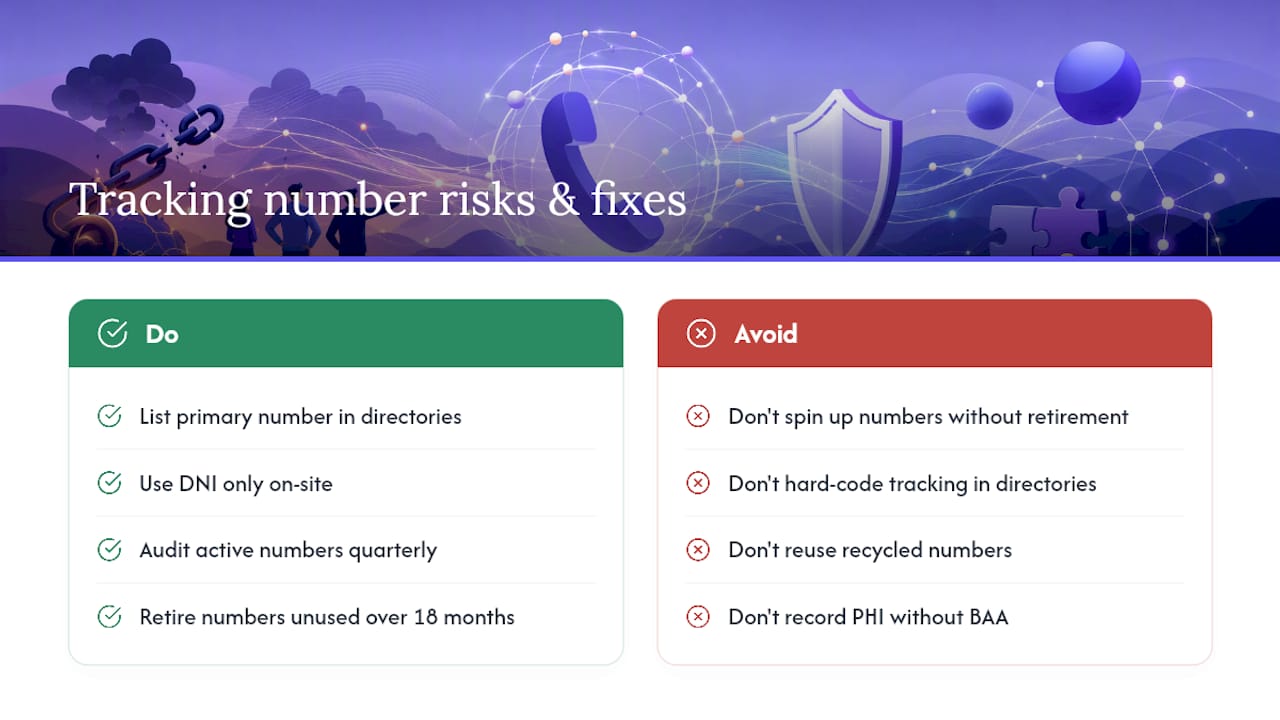
Number proliferation is the most common operational problem. Teams that spin up tracking numbers for every campaign without a retirement process end up with dozens of active numbers, some of which get recycled by carriers and assigned to unrelated businesses. A caller who dials a recycled number reaches the wrong company — and that interaction gets logged as a missed connect.
Hard-coded tracking numbers in third-party directories (Yelp, Google Business Profile, industry listings) create NAP inconsistency that damages local search rankings. The fix: list your primary business number in all directories and use DNI only for on-site attribution.
Reused tracking numbers are a real compliance and data-quality risk. Audit your active number inventory quarterly and retire any number that has been in use for more than 18 months without a fresh campaign assignment.
U.S. legal and compliance basics:
The Telephone Consumer Protection Act (TCPA) governs outbound calling in the United States. Key requirements: obtain prior express written consent before using an autodialer or prerecorded message to call a mobile number; honor Do Not Call (DNC) registry requests within 30 days; maintain internal DNC lists. For healthcare contexts, HIPAA adds a layer: call recordings that capture protected health information require a Business Associate Agreement with your recording vendor.
Recording consent rules vary by state. Federal law requires one-party consent, but states including California, Florida, and Illinois require all-party consent. Always confirm the rule for the state where your contact is located, not just where your team sits.
This is general information, not legal advice. Confirm current TCPA and state recording rules with a qualified attorney before rollout.
A daily workflow that keeps your call data clean
Rep daily checklist (takes under 5 minutes total):
- Log every dial before moving to the next contact.
- Tag the outcome with a standardized label.
- Set a follow-up date on every non-closed call.
- Flag any warm conversation with a short note.
Manager daily checks (10–15 minutes):
- Review the leaderboard for connected conversations and meetings set, not just dial volume.
- Sample three to five call recordings from reps with low conversation rates.
- Check the follow-up overdue queue and reassign or prompt any contact past its callback date.
The daily dial log framework used by high-performing prospecting teams tracks dials, contacts, appointments, and pipeline updates in real time. Leaderboards that surface connected conversations alongside raw dials give managers an honest picture of who is actually building pipeline.
Key Takeaways
Tracking dials matters because connected conversations, not raw dial counts, predict pipeline — and you can only manage what you measure consistently.
| Point | Details |
|---|---|
| Connected conversations over volume | Track conversation rate and connect rate as your primary leading KPIs, not dials alone. |
| Clean data before you track | Audit and verify contact lists before rollout or tracking will only document failure. |
| 30-day pilot structure | Run four weeks: baseline, instrument, train, review — then set one coaching focus from the data. |
| Daily logging discipline | Log every dial with outcome and follow-up date; gaps in the log break attribution and coaching. |
| Dialedsales for fast rollout | Dialedsales logs a call in 10 seconds, surfaces follow-up reminders automatically, and syncs to your CRM. |
The case for keeping it simple
Most sales teams don't fail at tracking because they lack data. They fail because the logging process is too slow, the fields are too many, and reps stop filling it out by week two. The teams that actually use their call data long-term tend to share one trait: the tool gets out of the way fast.
That's the design principle behind Dialedsales. Speed of logging matters more than depth of fields at the rep level. A leaderboard that shows connected conversations instead of just dials changes what reps compete on. Auto follow-up reminders mean a manager doesn't have to chase callbacks manually. None of that requires a six-week implementation or a dedicated admin.
The recommended use case is straightforward: outbound teams in home services, solar, insurance, real estate, HVAC, or financial services that want fast adoption, CRM-integrated logging, and a leaderboard that reflects real pipeline activity, not just effort.
Dialedsales: built for teams that need to move fast
If you've read this far, you already know what you need to track. The gap is usually execution speed — getting reps to log consistently from day one without adding friction to their workflow.
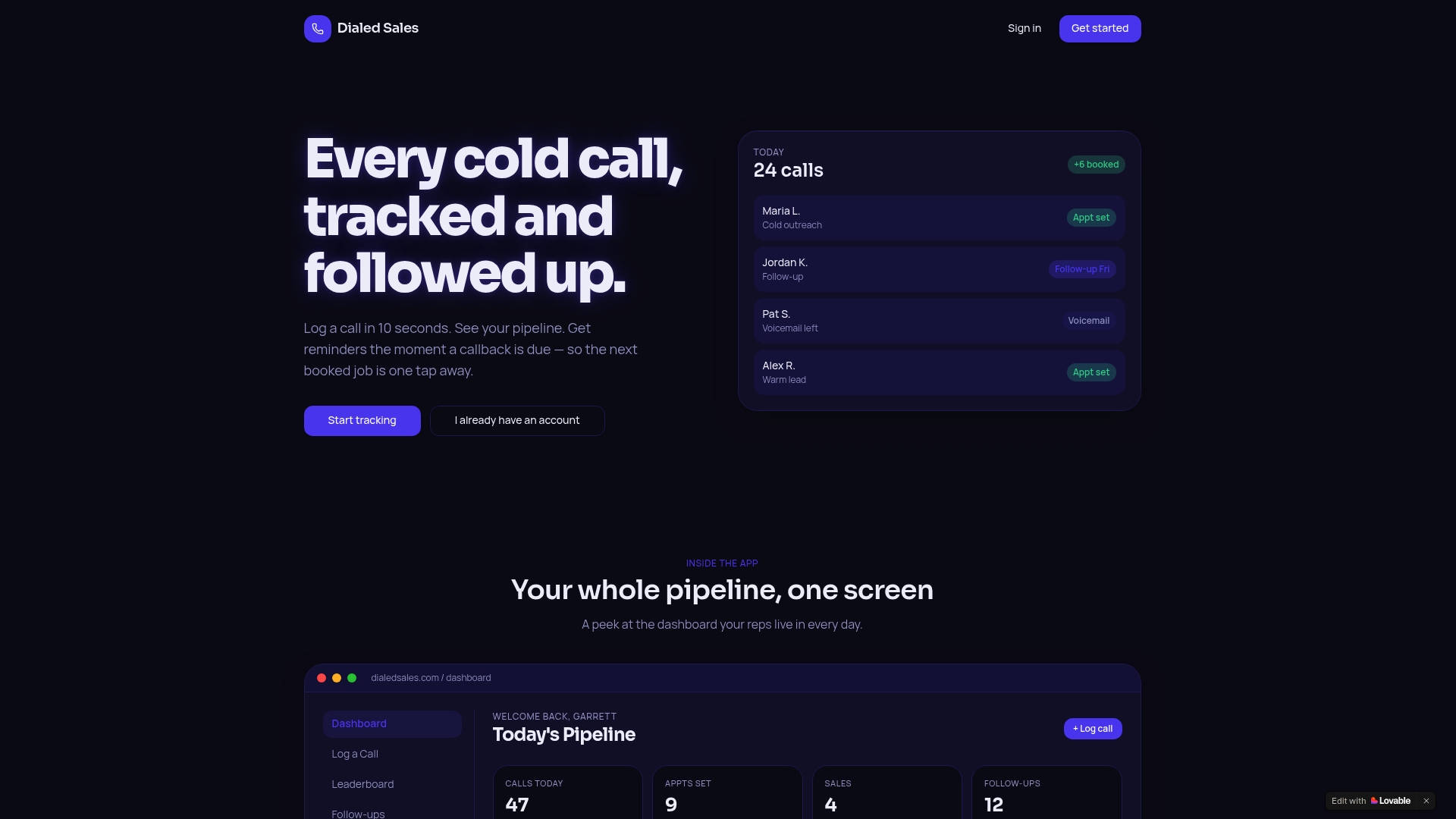
Dialedsales is built for exactly that. Log a call in 10 seconds. Set a follow-up that auto-surfaces on your dashboard when it's due. Watch your leaderboard shift from raw dials to connected conversations and meetings set. The onboarding is lightweight, the CRM sync is automatic, and the industry-specific use cases cover the verticals where outbound calling drives the most revenue.
The two-week free trial requires a credit card at signup. Start your pilot at dialedsales.com and have your first 30-day dataset in hand before the trial ends.