
The fastest way to track customer interactions over time is a chronological Customer Timeline: one scrolling record of every call, ticket, order, email, meeting, and social touch, layered with metrics and sentiment notes so trends jump out instead of hiding in a dozen separate tools. Microsoft's Customer Timeline view is the standard reference for this layout, and some platforms now add AI-generated relationship scores that update with every interaction instead of waiting for the next quarterly survey.
You don't need enterprise software to start. You need discipline.
- Log the call, email, or meeting the moment it happens, not at the end of the day.
- Tag an outcome and a next step, every time, no exceptions.
- Review the timeline weekly to catch accounts going quiet.
For outbound-heavy teams, a call-focused tool like Dialed Sales gets you there in days, not months.
Pro Tip: Start with just two fields, outcome and next step. Add complexity only after logging becomes a habit, not before.
Key Takeaways
Tracking customer interactions over time works when every call, ticket, and email lands in one chronological timeline paired with fast, consistent logging habits.
| Point | Details |
|---|---|
| Build one timeline | Centralize calls, tickets, orders, and emails into a single chronological view instead of scattered systems. |
| Capture ten core metrics | Mix quantitative counts with qualitative sentiment notes to see both what happened and why. |
| Log within 30 minutes | Set a strict SLA so outcomes get recorded while details are still accurate. |
| Review on a set cadence | Run daily, weekly, monthly, and quarterly checks tied to different decisions. |
| Protect the data | Apply GDPR/CCPA-appropriate retention and access limits to every stored interaction. |
| Execute with Dialed Sales | Use its 10-second call logging and auto-reminders to keep timelines current for outbound teams. |
Table of Contents
- Why Tracking Customer Interactions Improves Sales Outcomes
- What to Track: Events, Fields, and Key Metrics
- How Should You Structure the Underlying Data?
- What Tools and Setup Get You Running Fast?
- Who Owns the Data, and What Are the Rules?
- How Often Should You Review the Timeline Data?
- What Mistakes Undermine Timeline Data?
- What Privacy Rules Apply to Interaction Data?
- What Do Winning Teams Actually Do Differently?
- Try Dialed Sales for Call-Centric Tracking
- Frequently Asked Questions
- Sources
Why Tracking Customer Interactions Improves Sales Outcomes
A rep who opens a call already knowing what happened last time closes more deals than one starting cold. That's the entire case for interaction tracking, stripped of jargon.
- Faster context before every call means shorter warm-up and more selling time.
- Better prioritization surfaces the accounts going quiet before they churn.
- Targeted follow-ups based on real history beat generic scripted ones.
Modern interaction analytics can now review every voice and digital touchpoint with AI rather than the old approach of manually sampling 1 to 2 percent of calls, according to Verint's guide to interaction analytics. That shift alone changes how much a small team can see. New reps ramp faster when history is visible, and duplicate outreach drops because nobody has to guess whether someone already called last week.
What to Track: Events, Fields, and Key Metrics
A timeline is only as useful as what feeds it. Capture these event types at minimum:
- Calls, inbound and outbound
- Meetings and demos
- Email threads
- Support tickets
- Orders and contract activity
- Chat or direct message exchanges
- Churn indicators (canceled renewals, downgrade requests)
- Marketing touchpoints (webinar attendance, downloads)
Each event needs a minimum set of fields to be useful later: customer ID, timestamp, channel, outcome, next step, owner, and a short note capturing sentiment or context. Skip any of these and the timeline turns into a list nobody trusts.
On the metrics side, ten measures give you a full picture, mixing what happened with why it happened, as Shopify's engagement metrics guide and Mailchimp's engagement research both recommend:
- Event count per account (total touches over a period)
- Response time (how fast a customer replies)
- Conversion rate after a defined number of touches
- Repeat purchase or renewal frequency
- Relationship score (a rolling engagement trend, not a single snapshot)
- NPS trend over multiple cycles
- CSAT per interaction
- Time since last touch
- Touch density (interactions per week per account)
- Escalation frequency (tickets or complaints per period)
Pro Tip: Structured fields keep dashboards clean, but a one-line free-text note is what actually explains a lost deal six months later. Require both, every time.
How Should You Structure the Underlying Data?
A timeline is only a display layer. Underneath it, you need a data model simple enough that any system can feed it: a unique customer identifier, event records with timestamps, a source system tag, and a normalized event type so a "call" from your dialer and a "call" logged manually in a spreadsheet count as the same thing.
Most teams pull from three or four sources: CRM activity logs, a ticketing table, call records, and order history. Pega's documentation on customer timelines notes that timelines often default to service records alone unless you deliberately configure them to pull in sales and custom event types too. Centralizing everything into one event store, rather than leaving data scattered across four logins, is what makes chronological queries possible in the first place.
The single biggest failure point isn't missing data. It's the same customer existing as three different profiles because of an email typo, a maiden name, or a social handle nobody linked back to the account.
Helpdesk platforms like Gorgias solve part of this by auto-generating AI summaries for long ticket threads and letting agents filter by order versus ticket history. If you're building this yourself, sketch a simple diagram: one customer ID box, four or five event-source boxes feeding into it, and a single timeline output. That picture alone prevents most integration headaches.
What Tools and Setup Get You Running Fast?
You don't need a data team. You need a checklist:
- Turn on call logging first. It's the highest-volume, lowest-friction event type.
- Map your event fields (outcome tags, channel labels) before you import anything.
- Build one timeline dashboard before you build ten reports.
- Set standard filters: last 30, 90, and 365 days.
- Configure follow-up reminders so nothing falls through after a call ends.
A useful home dashboard filters by time, channel, owner, and interaction type, letting a manager slice the same data three different ways without touching a spreadsheet. AWS's guide for small businesses makes the same point: filterable dashboards let non-technical teams spot trends without hiring an analyst.
- One-tap call logging with a name, outcome, and note beats a ten-field form every time.
- Templated outcome tags (connected, voicemail, callback requested) keep data consistent across reps.
- Auto-created reminders when a follow-up date is set remove the need to remember anything.
For teams built around outbound calling, Dialed Sales is worth trying specifically because it treats the call log as the primary event, not an afterthought bolted onto a general CRM.
Pro Tip: If a rep can't log a call in under 10 seconds, they'll stop logging calls within a week. Speed of entry is not a nice-to-have.
Who Owns the Data, and What Are the Rules?
Consistency beats sophistication. A messy timeline with clean rules beats a fancy one nobody trusts.
- Reps log every interaction the same day it happens, no batching from memory later.
- Managers audit a sample of logs weekly for missing fields or vague notes.
- Ops owns the dashboard itself: filter presets, event-type definitions, and access.
Set a hard SLA: log the outcome within 30 minutes of the call ending, while details are still fresh. Require customer ID, outcome, and next step on every entry; treat everything else as optional.
A workable note template: what happened, what action you took, what happens next, plus one sentence of context ("Price objection, said budget resets in Q2"). That single sentence often matters more than the structured fields around it.
| Role | Responsibility | Example |
|---|---|---|
| Rep | Logs every call within 30 minutes | Notes outcome, sets next follow-up date |
| Manager | Audits log quality weekly | Flags reps with vague or missing notes |
| Ops/Admin | Owns dashboard configuration | Maintains filter presets and event definitions |
Pro Tip: Print the note template and tape it to a monitor for the first two weeks. Habits form faster than policies stick.
How Often Should You Review the Timeline Data?
Match your review cadence to the decision it drives. Daily reviews catch top-of-funnel problems, like a rep who logged zero calls. Weekly reviews are for coaching, walking through a rep's actual notes, not just their numbers. Monthly reviews check overall pipeline health, and quarterly reviews justify bigger strategic shifts.
Useful dashboards to run on that cadence:
- Interaction velocity (touches per account per week)
- Response time trend
- Relationship score movement across the portfolio
- Touch density by account tier
- Conversion rate after a specific number of touches
Watch for these signals and act when you see them:
- A relationship score falling for two periods in a row
- Time-since-last-touch climbing past your team's normal window
- A sudden spike in support tickets from one account
- A declining demo-to-close rate over a full quarter
A simple test worth running: split similar leads into two groups, follow up within an hour for one and within a day for the other, then compare conversion after 30 days. The Mailchimp research on pairing metrics with sentiment notes is a good reminder here: the number tells you conversion dropped, but the notes tell you why.
What Mistakes Undermine Timeline Data?
Five patterns quietly wreck a timeline before anyone notices: inconsistent owner fields, logging delayed by hours or days, events left as free text with no structured tag, entire channels (social, chat) never captured at all, and duplicate customer profiles splitting one account's history in two.
Run this checklist before launch, and again 30 days in:
- Standardize event types across every source system.
- Enforce the 30-minute logging SLA without exceptions.
- Centralize events into one store, not four separate logins.
- Set your default dashboard filters before reps start using it.
- Audit for duplicate profiles at the 30-day mark, not the 90-day mark.
Fix delayed logging with reminders at the point of action, not a manager chasing people later. Fix duplicate profiles with a single required identifier, like a phone number, at intake.
What Privacy Rules Apply to Interaction Data?
Every logged call, email, and ticket is personal data about a real person, and that comes with obligations, not just opportunity. If you sell into the European Union or the United Kingdom, GDPR governs how long you retain interaction records and what you can do with sentiment notes attached to a name. If your customers are in California, the CCPA gives them the right to know what you've logged and to request deletion. Neither law is optional based on where your company is headquartered. Both follow the customer.
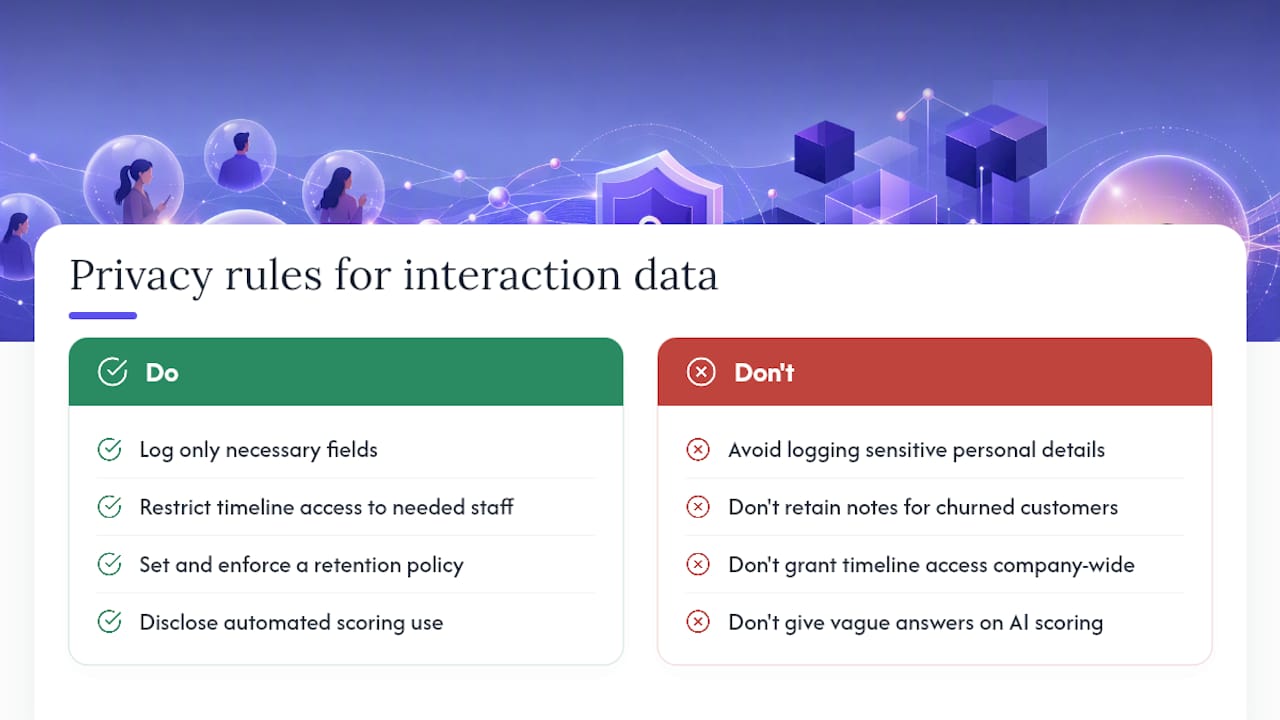
Practical rules that keep a sales team out of trouble: never log sensitive personal details (health, financial specifics beyond what's needed) in a free-text note. Restrict timeline access to people who actually need it, not the whole company. Set a retention policy and stick to it. A customer who churned three years ago probably shouldn't still have detailed call notes sitting in an active dashboard.
Sentiment analysis and AI-generated relationship scores raise a second issue: transparency. If your process uses automated scoring to flag at-risk accounts, be ready to explain that in plain terms if a customer asks how you're using their data. Vague answers erode trust fast, and in some jurisdictions they violate disclosure requirements outright.
None of this should scare a sales team away from tracking interactions. It should shape how you build the system: fewer unnecessary fields, clearer access controls, and a retention clock that actually runs.
What Do Winning Teams Actually Do Differently?
The teams that win aren't the ones with the fanciest dashboard. They're the ones where logging a call feels as automatic as ending it. I've watched a manager turn around a stalled team just by making the 30-minute logging rule non-negotiable for two weeks. Close rates climbed because reps started noticing patterns they'd been missing for months.

My one habit worth stealing: review five timelines a week, not five reports. Notes reveal what dashboards hide.
Try Dialed Sales for Call-Centric Tracking
If your team lives on the phone, Dialed Sales is built around the exact workflow this guide describes: log a call in 10 seconds with customer name, outcome, and a note, set a follow-up date that surfaces automatically when it's due, and watch your close rate on a dashboard that updates with every call, not once a week.
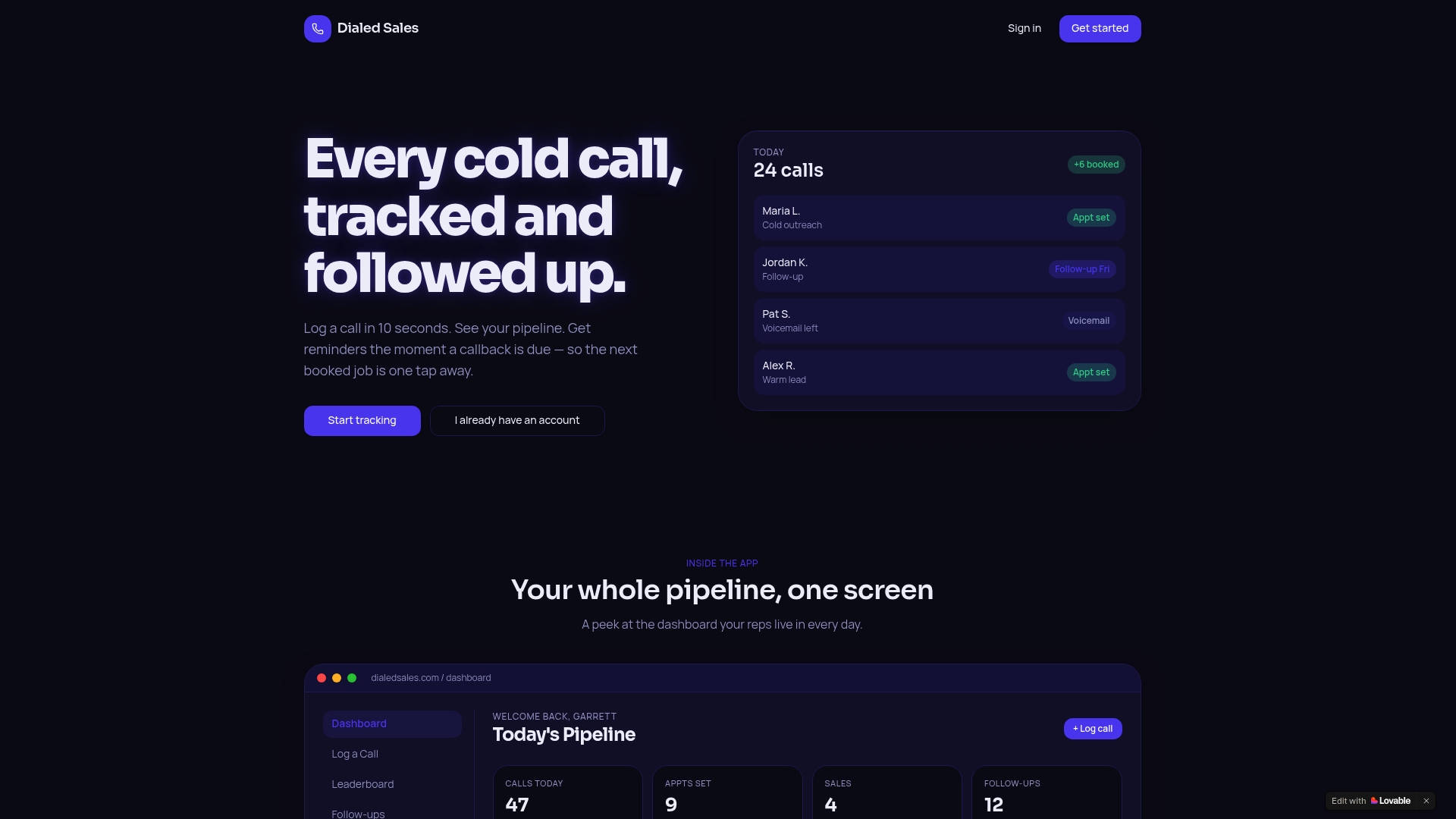
It skips the setup overhead of a general CRM because the call log is the product, not a feature buried three menus deep. Per-rep activity stats and real-time leaderboards give managers the weekly review data this guide recommends without building a single custom report. If you're running an outbound team in home services, solar, insurance, or any call-heavy industry, start a free trial of Dialed Sales and get your first timeline running before your next round of calls.
Frequently Asked Questions
What's the simplest way to start tracking customer interactions over time? Start with call logging alone. Record customer name, outcome, and a next-step note for every call, then add other event types like email and tickets once that habit sticks.
How often should sales teams review interaction history? Daily for urgent alerts, weekly for coaching sessions, monthly for pipeline health, and quarterly for bigger strategic decisions about territory or account assignment.
What's the difference between customer interaction history and a CRM? A CRM stores customer records and deal stages. Interaction history is the chronological log of every touchpoint tied to those records, which most CRMs support but few enforce consistently without added discipline.
Do I need AI tools to analyze customer interaction data? No. A filterable dashboard and consistent logging cover most sales use cases. AI-driven sentiment scoring adds value at scale, but a small team gets most of the benefit from clean data and a weekly review habit.
How long should I retain customer interaction data? Set a retention period that matches your legal obligations under laws like GDPR or the CCPA and your actual business need. Keeping detailed notes on inactive accounts for years past churn creates risk with no upside.
Sources
- Customer timelines: timeline view (Microsoft Dynamics docs)
- Customer engagement metrics (Mailchimp resources)
- A basic guide to customer interaction analytics for small and medium businesses (AWS SMB blog)
- Customer engagement metrics (Shopify blog)
- Customer interaction analytics (Verint guide)