
The most common cold call tracking errors are inconsistent logging, missing follow-ups, wrong associations, duplicate or missing call records, and blank outcomes. Each one has a specific, high-leverage fix you can apply today.
Here's the short version:
- Inconsistent logging and thin notes: make outcome and notes mandatory before a rep can close the call screen.
- Missing follow-ups: auto-generate a follow-up task the moment a disposition is set, with a real due date and time.
- Wrong associations: enforce a contact-to-company-to-deal precedence rule instead of letting reps guess.
- Duplicate or missing records: require an external call ID so retries update the same record instead of creating a new one.
- Blank outcomes: disable the "skip" option on disposition fields entirely.
These aren't abstract best practices. They're a mix of process changes, CRM configuration, and integration decisions your team can make this week.
Key Takeaways
Fixing cold call tracking comes down to making outcomes mandatory, automating follow-ups, and giving every call a stable identity across systems.
| Point | Details |
|---|---|
| Mandatory disposition | Require an outcome field before a rep can close the call screen, eliminating blank outcomes. |
| Stable external IDs | Use idempotent call IDs so webhook retries update existing records instead of duplicating them. |
| Association precedence | Enforce contact-to-company-to-deal order and flag ambiguous matches for manual review. |
| Weekly QA sampling | Review 20 calls weekly, targeting near-zero blank outcomes and under 2 to 3 percent unassociated calls. |
| Unified tracking tools | Apps like Dialed Sales pair 10-second logging with automatic follow-up reminders to close the sync gap. |
Table of Contents
- What Are the Most Common Cold Call Tracking Errors?
- What Causes These Cold Call Tracking Errors?
- How Do You Fix Cold Call Tracking Errors This Week?
- How Do You Run a Weekly Call Tracking QA Audit?
- Who Should Own Your Call Tracking Rules?
- Why Does Stale Pipeline Data Keep Showing Up?
- Are Inconsistent Call Record Names Hurting Your Reports?
- Are You Actually Tracking Call Duration and Quality?
- Why Don't Your Phone System and CRM Agree?
- Is Poor Training the Real Reason Your Data Is Messy?
- Are You Handling Call Recording Compliance Correctly?
- What I've Learned Rolling Out Call Tracking Fixes
- Stop Losing Callbacks: Try Dialed Sales
- Sources
What Are the Most Common Cold Call Tracking Errors?
Every one of these errors looks small in isolation. Stacked together across a team of ten reps making 40 calls a day, they quietly wreck your forecast accuracy and your coaching data.
Inconsistent logging and incomplete notes happen because most reps log calls from memory, usually in a batch at the end of the day. Notes written at 4:45 PM about a call from 10:30 AM are thin, generic, and often wrong on details like objections raised or next steps promised. Watch for two tells: note length shrinking as the day goes on, and reps keeping a personal spreadsheet "just in case" the CRM entry doesn't stick.
Disconnected or missing follow-up tasks are the single biggest silent killer of pipeline. A rep promises to call back Thursday, logs the outcome, and never creates the task. Thursday comes and goes. The prospect assumes you forgot them, because you did.
Wrong associations happen when a call gets logged to the wrong contact, or to a contact with no company or deal attached. The call technically exists in the system, but it's invisible on the timeline anyone actually checks.
Duplicate or missing call records trace back to webhook retries and missing external IDs, a technical issue covered in more depth below.
Blank or misused outcomes corrupt your reporting more than any other single error. If disposition is optional, a meaningful share of calls end up marked "Unknown," and your close-rate math is built on sand.
Seven distinct data gaps like these can cost B2B teams up to 12% of revenue when nobody is watching for them. That's not a rounding error in a sales operation running on tight margins. Beyond the revenue hit, limited attribution between calls and closed deals makes it nearly impossible to know which reps, scripts, or call times actually drive pipeline. That weakens every hiring and coaching decision downstream.
What Causes These Cold Call Tracking Errors?
Most tracking errors aren't a training problem. They're a plumbing problem. Here's how the plumbing breaks:
- Event timing mistakes. Logging a call the moment it starts, rather than when it ends, produces a partial record. The call outcome and duration get written before either exists. The fix is to log on call-ended and patch in the recording URL once it's actually ready, a pattern detailed in guides to connecting a dialer to your sales stack.
- Field mapping and picklist mismatches. A dialer disposition called "Not Interested" that doesn't map to any CRM stage just gets dropped or defaults to blank.
- Association logic gaps. One phone number can match three contact records, or none. Without a clear precedence rule, the system either guesses wrong or skips the association entirely.
- Webhook retry duplication. Every dialer retries failed webhook deliveries. Without a stable external ID, every retry becomes a new call record instead of an update to the existing one.
- Seat gating and permission gaps. Recordings and transcripts sometimes exist but stay invisible to a manager whose license tier doesn't include transcription access.
Pro Tip: Ask your integration provider one direct question: "Do you use idempotent external IDs on call records?" If the answer is vague, you have a duplicate problem waiting to happen.
How Do You Fix Cold Call Tracking Errors This Week?
Start with the fixes that need zero engineering time.
Make disposition mandatory through a short wrap-up screen that pops the moment a call ends. Ten to twenty seconds, one required field, done. Reps resist this for about a week, then stop noticing it.
- Require an external call ID on every record so retries upsert the existing call instead of duplicating it.
- Set association precedence: contact first, then company, then deal, with ambiguous matches flagged for a human instead of auto-assigned.
- Automate follow-up creation directly from the disposition, with the exact due date and time attached, not a vague "follow up soon" note.
- Tighten your middleware mapping if calls keep breaking, or move to a unified tool where the dialer and the CRM record share the same source of truth.
Pro Tip: If your team is still copy-pasting call notes from a dialer into a CRM tab, that manual step is where most inconsistent logging actually originates. Removing the copy-paste step fixes more errors than any training session will.
How Do You Run a Weekly Call Tracking QA Audit?
Data integrity doesn't hold on its own. It needs a recurring check, and twenty minutes a week is usually enough to catch problems before they become a quarter's worth of bad forecasting.
- Sample 20 calls at random. Confirm each has a correct outcome, the right association, and a working recording link.
- Track your blank-outcome rate. This should sit near zero. Anything higher means your disposition field isn't actually mandatory in practice.
- Track your unassociated-call rate. Keep it under 2 to 3 percent. Above that, your association logic needs review.
- Check your duplicate rate. It should be zero. Any duplicates point straight back to a missing or unstable external ID.
- Scan integration logs for failed pushes or repeated retries, which usually surface the duplicate problem before your reports do.
- Run a duration-distribution check. A spike of calls logged at 0 to 3 seconds usually means phantom connects, not real conversations.
| Metric | Target |
|---|---|
| Blank outcome rate | Near 0% |
| Unassociated call rate | Under 2-3% |
| Duplicate call rate | 0% |
| Sample size for manual review | 20 calls per week |
Who Should Own Your Call Tracking Rules?
Fixes only stick when someone owns them. Split ownership clearly: RevOps controls fields, picklists, and integration mappings. Sales managers own coaching tags and disposition definitions. Legal owns consent language and do-not-call suppression.
Every picklist change needs a version history. When a disposition label changes from "Not Interested" to "No Fit," old reports referencing the original label will break unless you keep a mapping table connecting old values to new ones.
- Test every association or mapping change in a sandbox before it touches production data.
- Require role-based access controls so only approved users can edit disposition definitions or association logic.
- Keep audit trails on every field change, not just call records, so you can trace when and why a mapping broke.
- Confirm your dialer and CRM vendors have a signed data-processing agreement covering call recordings.
Pro Tip: Treat every picklist edit like a code deployment. One unannounced change to a disposition label can quietly break three months of pipeline reports before anyone notices.
Why Does Stale Pipeline Data Keep Showing Up?
A deal can look "active" in your CRM for two weeks after the actual conversation moved it forward or killed it. That gap between what happened on the phone and what the CRM shows is the single biggest reason forecasts miss.
The usual cause: call outcomes get logged, but they don't trigger a stage change. A rep marks a call "Ready to Buy," yet the deal sits in the same pipeline stage it was in yesterday because nothing connects the disposition to the deal record. Managers reviewing pipeline in a Monday meeting are looking at Wednesday's reality from the week before.
Real-time status updates fix this by tying disposition directly to stage movement. When a call ends with "Not Interested," the deal should move to closed lost automatically, not sit open until someone remembers to touch it manually. When a call ends with "Callback Scheduled," the deal stage and the follow-up date should update in the same motion.
The practical test: pull your pipeline report right now and cross-check five "active" deals against the actual call history. If any of them show no call activity in the past week despite an "active" tag, you've found your stale data problem. Teams that fix this typically find their forecast accuracy improves within the first reporting cycle, simply because the numbers finally reflect calls that already happened instead of calls from days ago.
Are Inconsistent Call Record Names Hurting Your Reports?
Open your call log and search for a specific prospect. If you get back three different naming formats: "John Smith Call," "JSmith 3/4," and a blank subject line, you have a naming convention problem, and it's costing you searchability and reporting accuracy.
Inconsistent naming doesn't just look sloppy. It breaks filters. A manager trying to pull every call tagged for a specific campaign or lead source can't do it reliably if half the team names calls by contact and the other half names them by company or leaves the field untouched.
The fix is a fixed naming template, applied automatically wherever possible rather than left to rep discretion. Something like: [Contact Name] – [Call Type] – [Date] gives you a record that's searchable, sortable, and consistent across every rep on the team. Automate it at the point of logging so reps never type a call subject manually. Manual naming, even with a documented standard, drifts within a month as reps default back to habit.
This matters more than it sounds like it should, because naming consistency is what makes bulk reporting possible. A manager pulling a month of call activity for a coaching review needs to filter cleanly by call type or outcome. Inconsistent naming means that filter either misses records or catches the wrong ones, and the coaching conversation ends up based on incomplete data.
Are You Actually Tracking Call Duration and Quality?
Plenty of teams track call count religiously and ignore call duration almost entirely, which means they're measuring activity without measuring whether that activity does anything.

Duration matters because it's the fastest proxy for a real conversation versus a phantom connect. A call logged at 4 seconds isn't a conversation, it's a voicemail drop or a hang-up, and if your reports treat it the same as a 6-minute qualifying call, your connect-rate numbers are inflated and meaningless. Run a duration-distribution check periodically: if a meaningful cluster of calls sits under 5 seconds, something in your dialer or logging setup is counting non-connects as connects.
Quality metrics go a layer deeper than duration. Talk-to-listen ratio, number of questions asked, and whether the rep actually reached a clear next step are the markers that separate a call that moved a deal forward from one that just burned time. Few teams track this manually, since it requires either call recording review or an AI layer that scores calls automatically.
The practical starting point: require duration on every call record without exception, then spot-check quality through your weekly QA sample rather than trying to score every call. A manager who reviews 20 calls a week for both duration outliers and conversation quality catches nearly everything a full-scale monitoring system would, at a fraction of the setup cost.
Why Don't Your Phone System and CRM Agree?
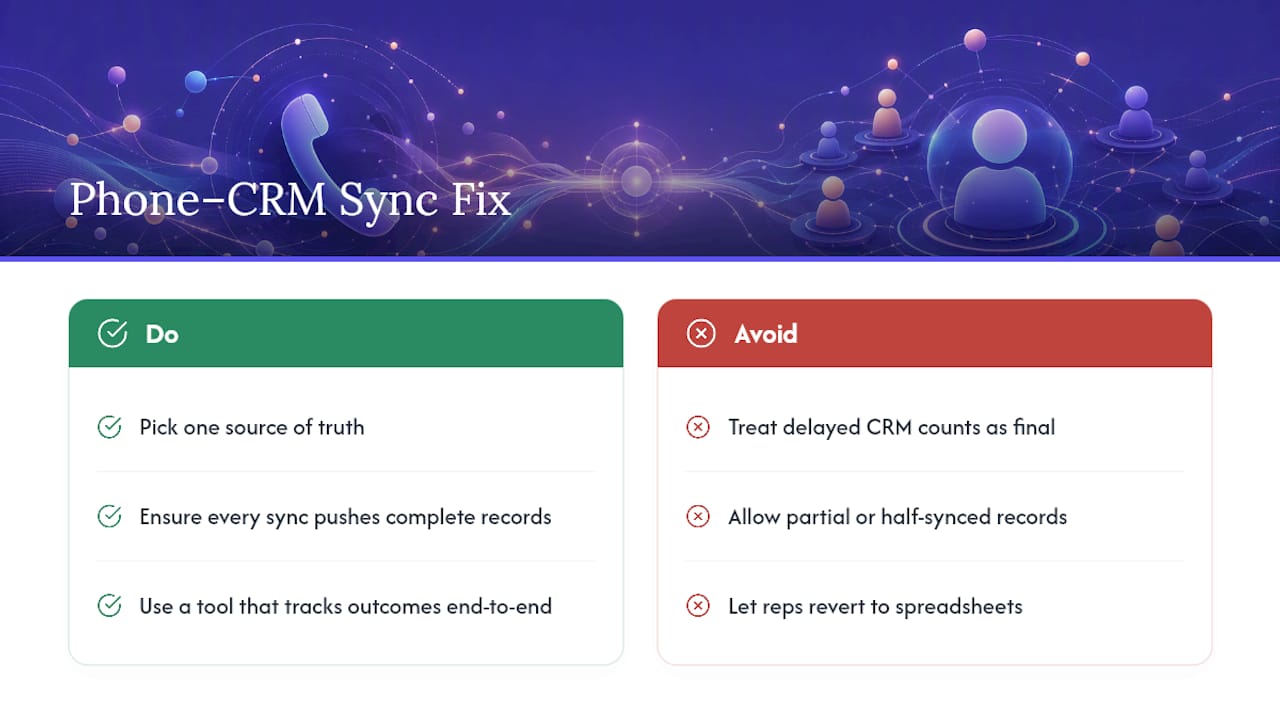
Ask any sales manager where the real number of calls made yesterday lives, and you'll often get two different answers: one from the dialer's own reporting, one from the CRM. That disagreement is a synchronization problem, and it's more common than most teams admit.
The root cause is almost always timing and reliability, not a fundamentally broken connection. Calls get pushed from the phone system to the CRM on a delay, sometimes minutes, sometimes hours during a backlog. If a rep checks their CRM pipeline mid-afternoon, they might be looking at a picture that's missing everything from the last two hours of dialing.
Poor synchronization also shows up as partial records: a call that syncs its metadata (who, when, how long) but not the recording, or a recording that syncs but never gets linked back to the right contact. Each half-synced record is a small trust erosion. Reps stop believing the CRM reflects reality, and once that happens, they go back to logging things manually in a spreadsheet, which reintroduces the exact inconsistent-logging problem you were trying to eliminate in the first place.
The fix isn't complicated in concept, even if it takes real integration work: pick one system as the source of truth, and make sure every sync pushes complete records, not partial ones. If your current setup can't guarantee that, a tool built to track outcomes consistently from the point of logging removes the sync gap entirely.
Is Poor Training the Real Reason Your Data Is Messy?
Hand a rep a CRM with fourteen required fields and no walkthrough, and you'll get exactly what you'd expect: fields filled in wrong, skipped, or filled with placeholder junk just to get past a validation error.
Most call tracking errors that look like a tooling problem are actually a training problem wearing a tooling costume. A rep who was never shown the difference between "No Answer" and "Voicemail" as disposition options will pick whichever one is listed first, every time, regardless of what actually happened on the call. Multiply that across a team, and your disposition data becomes meaningless within a month.
The fix isn't a one-time onboarding session. New hires need a short, specific walkthrough on exactly how to log a call, set a follow-up, and choose the right disposition, ideally under ten minutes since anything longer gets forgotten by the second week. Existing reps need periodic refreshers whenever a field or workflow changes, because silent process drift is just as damaging as never training people in the first place.
The manager's job here is smaller than it sounds: watch the weekly QA sample for patterns that point to confusion rather than carelessness. If three reps all misuse the same field the same way, that's not three individual mistakes. That's a training gap with one root cause and one fix.
Are You Handling Call Recording Compliance Correctly?
Every call recording your team makes touches consent law, and the rules vary by state and by whether the call crosses state lines. Some states require only one party to consent to a recorded call; others require every party on the line to agree. Getting this wrong isn't just a data hygiene issue, it's a legal exposure issue, and it deserves more attention than most sales teams give it.
Beyond consent, do-not-call list compliance and recording retention policies both need clear ownership. Recordings shouldn't sit indefinitely in a system with no retention policy, and access to those recordings should be limited to people who actually need it for coaching or QA, not open to the entire sales floor.
Build compliance into the same workflow that fixes your other tracking errors, rather than treating it as a separate project. Role-based access controls that limit who can hear a recording, an audit trail showing who accessed what and when, and a documented retention schedule are the same governance tools you're already using for data mapping and disposition rules. Confirm your dialer and CRM vendors carry a signed data-processing agreement covering recorded calls, and check that your recording consent language matches the law for every state your reps are calling into, not just your own headquarters state.
What I've Learned Rolling Out Call Tracking Fixes
The fastest improvement any team sees comes from exactly two changes made together: mandatory dispositions and automated follow-up creation. Neither one alone moves the needle much. Mandatory outcomes without automated follow-ups just gives you cleaner data about missed callbacks. Automated follow-ups without mandatory outcomes trigger off garbage dispositions.
Rolling out both at once fixes the two errors that compound each other the fastest, and teams typically see the pipeline stabilize within the first couple of reporting cycles. For a deeper walkthrough on disposition design, the activity tracking methods breakdown covers the specifics.
— Garrett
Stop Losing Callbacks: Try Dialed Sales
Every error covered here traces back to the same root problem: tracking that depends on memory, manual entry, or a fragile sync between two separate systems. Dialed Sales was built around a different premise. Log the call with outcome and notes in about 10 seconds, and the follow-up reminder surfaces automatically on your dashboard the moment it's due.
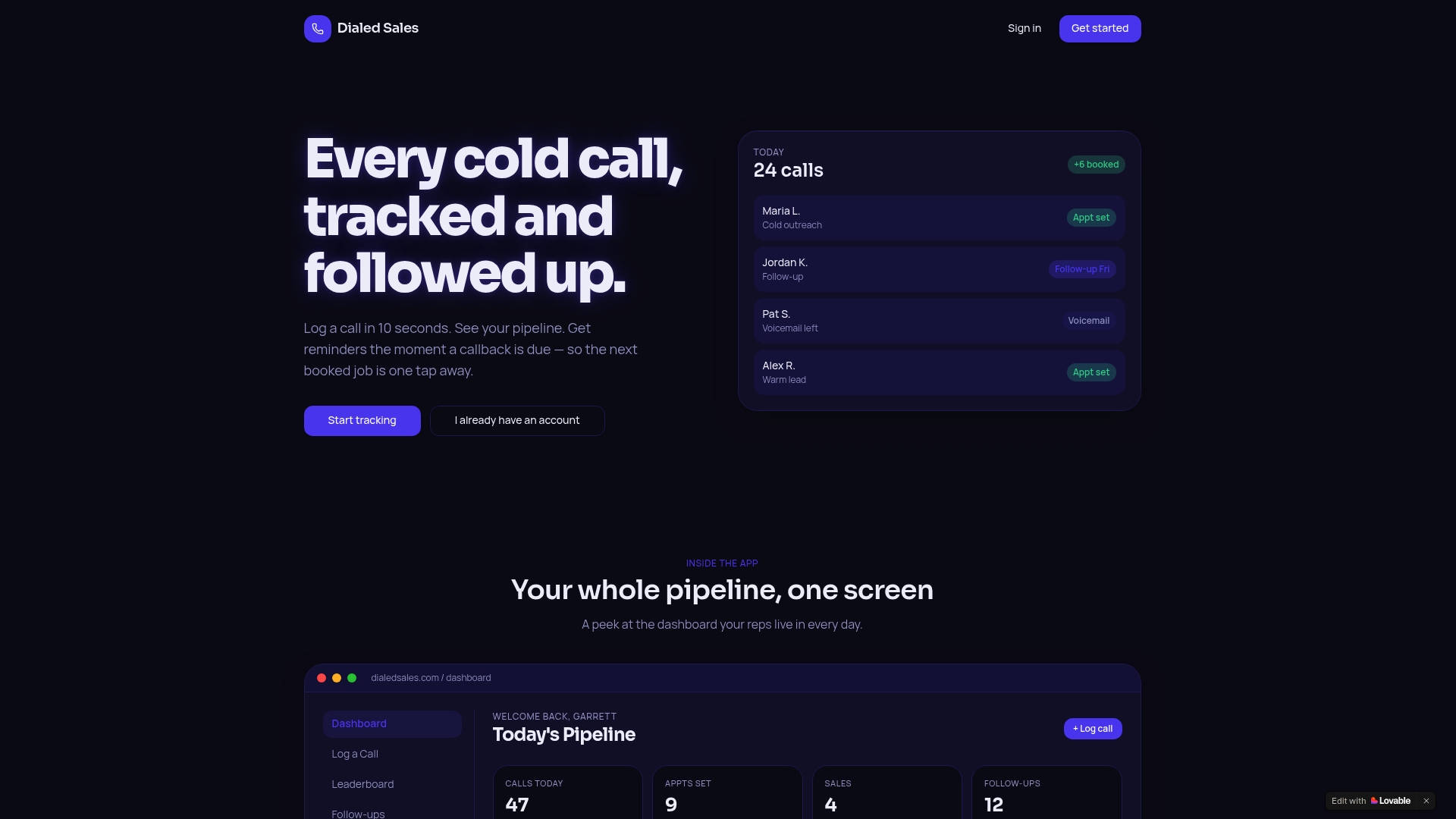
Because disposition is required at the point of logging, blank outcomes stop happening by design. Because the dashboard is real-time, your pipeline reflects this morning's calls, not last week's. Every rep gets their own activity stats, and managers get a live view of the team without chasing spreadsheets or waiting on a sync job that might run late.
If you're running the weekly QA checklist from this article against your current stack, run it again after a 14-day trial with Dialed Sales and compare the two results side by side. Most teams see their blank-outcome and unassociated-call rates drop within the first week simply because the workflow no longer allows the shortcuts that caused them.
Sources
- The 7 Biggest B2B Cold Calling Data Gaps (And How To Close Them)
- The Hidden Cost of Reps Copy-Pasting Between Their Dialer and CRM
- Cold Calling CRM Integration in 2026: CTI, Logging & QA
- Cold Calling CRM Integration — How to Connect Your Dialer to Your Sales Stack | Systemify