
Targeted, trigger-driven cold calls that open with a one-line reason for calling will book meetings with decision makers faster than any generic pitch-first approach. The reps who consistently land those meetings aren't more charming or more persistent. They're more prepared, and they follow a system.
Here's the instant checklist for your next three dials:
- Who to call: A decision maker at a company showing a buying signal (recent hire, funding round, tech change, or leadership shift) matched to your ICP.
- What to open with: "Hi [Name], I noticed [company] just [trigger]. I work with [role type] who run into [specific problem] when that happens. Is that on your radar?"
- What to ask: "What does your current process look like for [relevant area]?" Then stop talking.
Reps working targeted, trigger-driven lists consistently report dial-to-meeting conversion in the 5–10% range, compared to 2–3% on generic cold lists. That gap is almost entirely explained by preparation and opener quality, not call volume.
Key Takeaways
| Point | Details |
|---|---|
| Target with buying signals | Prioritize accounts showing triggers (hiring, funding, leadership change) over cold firmographic lists. |
| Open with relevance | State who you are, why you called, and why it matters in under 15 seconds, then ask a question. |
| Follow a checkpoint framework | Use the five-step flow: opener, qualify, probe, value reframe, ask. Internalize it so it sounds natural. |
| Persist across 4–8 touches | Combine calls, voicemails, email, and LinkedIn over 14 days before marking an account inactive. |
| Track and coach weekly | Log outcome, next step, and confidence level on every call; review conversation rate, meeting rate, and show rate each week. |
Table of Contents
- Why reaching the decision maker changes everything
- How to prepare before you dial a single decision maker
- When should you call decision makers?
- Opening lines that actually hook decision makers
- A repeatable call structure that qualifies fast
- How to handle objections and get past gatekeepers
- Multi-touch follow-up sequences that convert after the call
- What to track and how to measure cold-call performance
- Copy-paste scripts and role-play exercises
- Your 7-day practice plan and how managers can scale wins
- What most cold-calling guides get wrong about decision makers
- Sources
Why reaching the decision maker changes everything
Talking to the wrong person isn't just a wasted call. It's a wasted opportunity that often poisons the account. A gatekeeper or mid-level contact who can't say yes can absolutely say no, and once they do, getting to the real buyer becomes twice as hard.
Decision makers control the three things that actually move a deal: budget, timeline, and the vendor shortlist. When you reach them directly, you get real qualification data in real time. You learn whether there's a problem worth solving, whether money exists to solve it, and whether they're the person who signs off. Cold calling provides that direct access and immediate qualification in a way that email and LinkedIn simply can't replicate.
The phone also builds rapport faster than any asynchronous channel. A two-minute conversation carries tone, pace, and responsiveness. Those signals let a senior buyer size you up quickly, and they let you size up fit just as fast.
Two findings worth keeping in mind:
- Phone outreach with a specific, relevant reason for calling consistently outperforms cold email for executive contacts, where inbox saturation is highest.
- Decision makers who engage on a first call are significantly more likely to show up to a booked meeting than contacts who converted through a nurture sequence.
The practical implication: every minute spent getting past the wrong person is a minute not spent qualifying the right one. Build your list around decision-maker titles from the start, and treat every call that doesn't reach one as a routing problem to solve, not a conversion attempt.
How to prepare before you dial a single decision maker
Preparation is the single biggest lever for cold-call ROI, and most reps underinvest in it. The goal isn't a full dossier on every prospect. It's one precise reason to call, one insight that proves you did your homework, and one hypothesis about their problem.
Build a tight ICP first
Your ideal customer profile for decision-maker outreach should be specific enough that you can describe the person in one sentence. Define it by:
- Role and seniority: VP of Sales, Director of Operations, Owner, or whichever title holds budget authority in your category.
- Company size: Revenue band or headcount range where your solution fits without being over- or under-built.
- Tech stack signals: Tools they use that indicate a problem you solve (or a competitor you displace).
- Trigger events: Hiring sprees, funding announcements, leadership changes, product launches, or compliance deadlines.
Build high-fit lists with buying signals
A list of 50 accounts showing active buying signals will outperform a list of 500 cold firmographic matches every time. Prioritize accounts where you can name the trigger. Sources worth building into your workflow include LinkedIn for hiring and leadership signals, Crunchbase for funding, and job boards for tech-stack clues buried in job descriptions.
Data hygiene matters as much as targeting. Before a call block, verify:
- Mobile numbers over desk lines (decision makers rarely answer desk extensions).
- Title accuracy (people change roles; a stale title wastes the opener).
- Do-not-call screening for any consumer-facing numbers. The national Do-Not-Call registry is the required compliance check for consumer-targeted calling.
The 90-second pre-call ritual
Field-tested rituals show that a short, repeatable pre-call routine raises both call quality and dial volume. Here's what it looks like in practice:
- Pull up the account. Find one trigger (a LinkedIn post, a job listing, a news item).
- Write one sentence: "I'm calling because [trigger] usually means [problem]."
- Form one hypothesis: "My guess is they're dealing with [specific friction]."
That's it. Thirty seconds of reading, thirty seconds of writing, thirty seconds of mentally rehearsing the opener. Reps who compress research to this level can sustain personalization across 40+ dials a day without burning out.
Pro Tip: Keep a running "trigger bank" in a shared doc. When a teammate spots a signal (a company just posted five SDR roles, a CEO published a post about scaling), log it. The whole team benefits from shared intelligence, and it cuts individual research time in half.
When should you call decision makers?
Timing isn't magic, but it's not irrelevant either. Decision makers have predictable rhythms, and calling during low-attention windows (mid-afternoon on a Wednesday, first thing Monday) consistently produces lower connect rates.
The windows that tend to work best:
- Tuesday through Thursday, 8:00–9:30 AM in the prospect's local time zone. Executives are often at their desks before the day's meetings stack up.
- Tuesday through Thursday, 4:00–5:30 PM. The afternoon meeting block has usually ended; decision makers are wrapping up and more likely to pick up.
- Avoid Monday mornings (planning mode, low patience) and Friday afternoons (mentally checked out, low urgency).
A power-hour scheduling template
Structure your dial blocks rather than dialing whenever you have a free moment. A simple framework:
| Time Block | Priority | Activity |
|---|---|---|
| 8:00–9:30 AM | Hot triggers first | Accounts with fresh buying signals from the last 48 hours |
| 9:30–10:00 AM | Warm lists | Accounts that engaged with a previous touch (email open, voicemail callback) |
| 10:00–12:00 PM | Cold firmographic | New accounts matched to ICP but no signal yet |
| 4:00–5:30 PM | Hot triggers + callbacks | Re-dial any hot accounts that didn't connect in the morning block |
Within each block, work the hottest signals first. A prospect who just posted a LinkedIn article about a problem you solve is worth three cold firmographic matches. Sequence your queue accordingly, not alphabetically.
Multi-touch cadences also need scheduling discipline. If a prospect didn't connect on attempt one, the second attempt should follow within 24–48 hours while the trigger is still fresh. Attempts three through six can spread across the following two weeks, mixed with email and LinkedIn touches.
Opening lines that actually hook decision makers
The first 10–15 seconds determine whether a decision maker stays on the line or finds a polite exit. Openers that state who you are, why you called, and why it matters to the prospect in that sequence materially increase engagement. Four principles make them work:
- Relevance: Reference something specific to their company or role. Generic openers signal a generic call.
- Brevity: Get to the reason for calling in under two sentences. Decision makers have no patience for a slow build.
- Permission: A soft permission ask ("Do you have 30 seconds?") reduces defensiveness without giving them an easy out.
- Curiosity: End with a question that makes them think, not a pitch that makes them deflect.
Opener templates by trigger type and persona
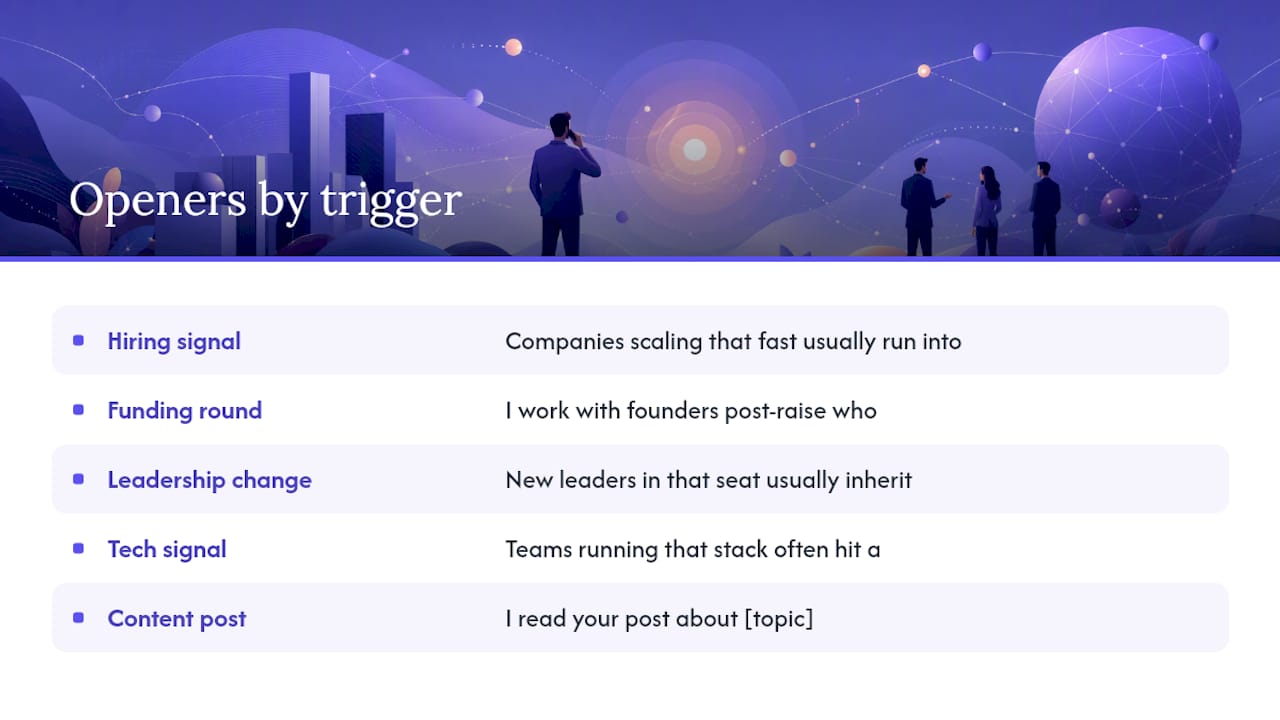
Hiring signal (any persona): "Hi [Name], I saw [Company] is hiring [X roles]. Companies scaling that fast usually run into [specific friction]. Is that something you're dealing with?"
Funding round (CEO/Founder): "Hi [Name], congrats on the [Series X]. I work with founders post-raise who are trying to [specific outcome] before the board asks about it. Is that on your list right now?"
Leadership change (VP/Director): "Hi [Name], I noticed you stepped into the [role] at [Company] recently. New leaders in that seat usually inherit [common problem]. How are you thinking about that?"
Tech signal (VP of Sales/RevOps): "Hi [Name], I saw [Company] is using [tool]. Teams running that stack often hit a wall with [specific gap]. Is that something you've run into?"
Content post (any senior buyer): "Hi [Name], I read your post about [topic]. You mentioned [specific point]. That's exactly the problem we help [role type] solve. I'd love to share how."
Cold firmographic, no signal (Director/VP): "Hi [Name], I work with [role type] at [company type] who are trying to [outcome]. I don't know if it's relevant for you, but it seemed worth a quick call. Do you have 30 seconds?"
Voicemail version (any trigger): "Hi [Name], this is [Your Name] at [Company]. I'm calling because [one-sentence trigger]. I'll send you a quick email with context, but if you want to talk before then, I'm at [number]. Talk soon."
Follow-up email subject line: "[Trigger] + a thought for [Company]"
A few notes on tonality: match the energy of the person you're calling. A CEO who posts punchy LinkedIn content wants a direct, confident opener. A Director of Finance wants precision and a clear reason. Avoid filler words ("just checking in," "I wanted to reach out") and never apologize for calling.
A repeatable call structure that qualifies fast
A cold call without a structure is a conversation without a destination. Modern cold calling success requires a system, not improvisation. The checkpoint framework below gives reps a mental map they can internalize in a week.
The five-checkpoint call flow
1. Opener (0–15 seconds) State your name, company, and the one-line reason for calling. End with a soft permission ask or a direct question.
2. Qualify (15–45 seconds) Confirm you're talking to the right person. "Are you the one who owns [relevant area] at [Company]?" If not, ask who does and get a warm transfer or a name.
3. Probe (45 seconds–2 minutes) Ask one open-ended discovery question and then listen. Don't stack questions.
4. Value reframe (2–3 minutes) Connect what they said to a specific outcome you deliver. One sentence. "What you're describing is exactly why [Company type] comes to us. We help them [specific result]."
5. Ask (3–4 minutes) Close for a specific next step. Two-option asks work well: "Would Tuesday at 10 or Thursday at 2 work for a 20-minute call?" Conditional closes also land cleanly: "If I can show you [specific thing] in 20 minutes, would that be worth your time?"
Discovery questions mapped to decision-maker priorities
Budget:
- "How are you currently funding [relevant initiative]?"
- "Is [problem area] something that has budget attached to it, or is it still in the 'nice to solve' category?"
Timeline:
- "How urgent is this for you right now?"
- "Is there a deadline driving the decision, or is this more of a longer-term priority?"
Stakeholders:
- "Who else would be involved in a decision like this?"
- "Is this something you'd evaluate on your own, or does it go through a committee?"
Role-play checklist for practicing the flow
- Can you deliver the opener in under 15 seconds without reading it?
- Can you pivot smoothly if they say "I only have two minutes"?
- Can you ask one discovery question and stay quiet for 20 seconds?
- Can you deliver the value reframe in one sentence?
- Can you close for a meeting without sounding like you're reading a script?
Run this checklist in a daily five-minute role-play with a teammate. One rep plays the skeptical decision maker; the other runs the framework. Rotate.
How to handle objections and get past gatekeepers
Objections from decision makers are almost never final. They're usually a signal that the relevance hasn't landed yet. The validate, reframe, question pattern is the cleanest way to handle the most common ones without sounding defensive.
Top objections and tested responses
"Not interested." Validate: "That's fair, most people I call aren't at first." Reframe: "I'm not asking you to be interested yet. I just want to know if [problem] is something you're dealing with." Question: "Is [specific pain] on your radar at all?"
"Send me some information." Validate: "Happy to." Reframe: "To make sure I send something relevant, can I ask one quick question?" Question: "What would make this worth 15 minutes of your time if the info checks out?"
"We already have a solution." Validate: "Good to know." Reframe: "A lot of the teams I work with had something in place too. The gap usually shows up in [specific area]." Question: "Is [specific gap] something you're happy with, or is there room to improve?"
"Bad timing." Validate: "Totally understand." Reframe: "I'll be quick. I just want to know if this is a 'not now' or a 'not ever.'" Question: "When would be a better time to revisit this?"
The gatekeeper playbook
Receptionists and executive assistants are not obstacles. They're routers. Treat them with the same respect you'd give the decision maker.
- Use the decision maker's first name. "Is [First Name] available?" sounds like a colleague, not a vendor.
- Don't over-explain. "It's regarding [Company]'s [trigger]" is enough. A long explanation signals a cold call.
- Ask for help. "I want to make sure I'm talking to the right person. Can you point me in the right direction?"
- Never lie about a prior relationship. It destroys credibility the moment the decision maker picks up.
- Get the assistant's name. Use it on the next call. "Hi [Name], it's [Your Name] again. Is [Decision Maker] available?"
Red flags that signal low fit
Disqualify early rather than waste both parties' time:
- They can't name a problem your solution addresses.
- Budget doesn't exist and there's no path to create it.
- The decision requires five stakeholders and a six-month committee process for a deal your product doesn't support.
- They've tried a direct competitor and had a bad experience they're not willing to revisit.
Disqualifying a bad fit in two minutes is a win, not a loss. It frees the next dial for a better account.
Multi-touch follow-up sequences that convert after the call
Most decision makers don't book a meeting on the first call. That's not failure; it's the normal pattern. Successful sequences typically require 4–8 touches across multiple channels before a decision maker engages. The reps who give up after two attempts leave the majority of their pipeline on the table.
Here's a 14-day, six-step cadence that works without being annoying:
- Day 1, Attempt 1: Call. If no answer, leave a voicemail (under 20 seconds) and immediately send a follow-up email.
- Day 2: Send a LinkedIn connection request with a short, personalized note referencing the trigger.
- Day 4, Attempt 2: Call again. No voicemail this time. Let it ring.
- Day 7, Attempt 3: Call. If no answer, leave a second voicemail with a different angle. Send a second email.
- Day 10: Light LinkedIn touch: comment on a post they made or share something relevant to their trigger.
- Day 14, Attempt 4: Final call. If no answer, send a short "break-up" email that leaves the door open.
For cold call follow-up best practices and sequencing templates, the Dialedsales blog covers the mechanics in detail.
Micro-templates by call outcome
Voicemail (no answer, first attempt): "Hi [Name], this is [Your Name] at [Company]. I'm calling because [one-sentence trigger]. I'll shoot you a quick email. If you want to connect before then, I'm at [number]."
Follow-up email (after voicemail): Subject: "[Trigger] + a thought for [Company]" Body: "Hi [Name], left you a voicemail. [One sentence on trigger.] [One sentence on the problem it usually creates.] Worth 15 minutes? [Calendar link]"
Second voicemail (Day 7, different angle): "Hi [Name], [Your Name] again at [Company]. I know you're busy. I'll keep this short: [different angle on the problem]. Happy to make this worth your time. [Number]."
Break-up email (Day 14): Subject: "Closing the loop" Body: "Hi [Name], I've tried a few times and haven't been able to connect. I'll stop reaching out for now. If [problem] ever becomes a priority, I'm easy to find. [Your Name]"
Voicemail paired with an immediate follow-up email primes the prospect to open your message. The voicemail creates context; the email gives them something to act on without picking up the phone.
Pro Tip: Personalization and scale aren't opposites. Use one variable per touch (the trigger, a LinkedIn post, a company milestone) and keep the rest of the template fixed. That one variable does most of the work.
What to track and how to measure cold-call performance
Tracking isn't paperwork. It's the feedback loop that turns a rep's instincts into a coachable, repeatable system. A complete cold-calling system includes measurement and continuous improvement as core components, not afterthoughts.
Minimum call logging fields
Every call log should capture five things:
- Contact name and title: Who you called and whether they're the decision maker.
- Outcome: Connected, voicemail, no answer, gated, meeting booked.
- Notes: One sentence on what was said or learned.
- Next step: The specific action and date.
- Confidence level: Hot, warm, or cold. This drives queue prioritization on the next dial block.
Logging these five fields takes under 30 seconds per call. Tools like Dialedsales are built specifically for this workflow: log a call in 10 seconds, set the follow-up date, and let the dashboard surface it when it's due. For a deeper look at cold call activity tracking methods, the Dialedsales blog covers logging best practices and minimal data fields.
Three KPIs to track every week
| KPI | Formula | Benchmark (cold list) | Benchmark (targeted list) |
|---|---|---|---|
| Conversation rate | Conversations ÷ dials | 5–10% | 15% |
| Meeting rate | Meetings booked ÷ conversations | 5–10% | 15–20% |
| Show rate | Meetings attended ÷ booked | 70% | 80% |
Conversation rate tells you whether your list and timing are right. Meeting rate tells you whether your opener and call structure are working. Show rate tells you whether your follow-up and confirmation process is solid. If one KPI is low, you know exactly where to coach.
The weekly review workflow
Managers can run a 15-minute weekly review using these three steps:
- Pull the week's call log. Sort by outcome. Look for patterns in the "no answer" and "gated" rows. Are the same accounts appearing repeatedly? Is the timing wrong?
- Listen to two or three recorded calls (or review notes from role-plays). Score each on opener, discovery question, and close attempt.
- Set one coaching focus for the following week. One skill at a time. Trying to fix everything at once fixes nothing.
For a structured approach to pipeline stage tracking and mapping call outcomes to pipeline states, the Dialedsales blog has a practical playbook worth bookmarking.
Copy-paste scripts and role-play exercises
Scripts aren't crutches. They're starting points. The goal is to internalize the structure so the words come naturally, not to read verbatim from a page.
Script 1: Direct decision-maker connect
Rep: "Hi [Name], this is [Your Name] at [Company]. I'm calling because I saw [trigger] and it made me think of a conversation I had with a [similar role] at [similar company] who was dealing with [problem]. Is that something you're running into?"
[If yes]: "Tell me more about how that's showing up for you."
[After discovery]: "Based on what you're describing, it sounds like [reframe]. We help [role type] with exactly that. Would it be worth 20 minutes to see if there's a fit? I have [day] at [time] or [day] at [time]."
Script 2: Gatekeeper route
Rep: "Hi, is [First Name] available?"
Gatekeeper: "Can I ask what this is regarding?"
Rep: "Sure, it's [Your Name] at [Company]. It's regarding [Company]'s [trigger]. I just need 30 seconds."
[If transferred]: Use Script 1 from the top.
[If blocked]: "No problem. Can I ask your name? I want to make sure I'm reaching out the right way. Is there a better time to try [First Name] directly?"
Script 3: Voicemail + email sequence
Voicemail: "Hi [Name], [Your Name] at [Company]. Quick one: I noticed [trigger] and thought it was worth a call. I'll send you a note. If you want to talk before then, I'm at [number]. Thanks."
Email (sent within five minutes): Subject: "[Trigger] + one thought for [Company]" "Hi [Name], just left you a voicemail. [One sentence on trigger.] Teams in your position usually deal with [problem]. If that's on your radar, I'd love to share how we've helped [similar company type] with it. 15 minutes? [Calendar link]"
Two qualifying call transcript examples
Example A (direct connect, strong fit): Rep: "Hi Sarah, it's [Name] at [Company]. I saw Acme just posted 12 SDR roles. Companies scaling their outbound team that fast usually hit a wall with call tracking and follow-up consistency. Is that something you're managing right now?" Sarah: "Actually, yeah. Our reps are logging calls in a spreadsheet and things are falling through the cracks." Rep: "That's exactly what I figured. We help sales leaders fix that in about a week. Would Thursday at 10 work for a quick look?"
Example B (gatekeeper route, partial success): Rep: "Hi, is Marcus available?" Gatekeeper: "He's in a meeting. Can I take a message?" Rep: "Sure, it's [Name] at [Company]. I'll also send him a quick email. What's the best way to reach him directly?" Gatekeeper: "You can try him after 4." Rep: "Perfect. I'll try then. Thanks for your help."
3-step role-play checklist for daily huddles
- Opener drill (2 minutes): One rep plays a skeptical VP. The other delivers the opener for a specific trigger. Swap. Debrief on what landed.
- Objection drill (2 minutes): Manager calls out an objection ("Send me info," "Not interested"). Rep responds using validate, reframe, question. No notes.
- Close drill (1 minute): Rep practices the two-option ask and the conditional close back-to-back. Time it. If it takes more than 10 seconds, trim it.
Your 7-day practice plan and how managers can scale wins
The fastest way to improve cold-call performance is to focus on one skill per week, measure it, and move to the next. Trying to overhaul everything at once produces noise, not progress. Treating cold calling as a repeatable habit — tune, rehearse, review — is what separates consistent performers from streaky ones.
The 7-day rep practice plan
- Days 1–2: Openers only. Write three trigger-specific openers for your top accounts. Drill them in role-play until they sound natural. Track conversation rate.
- Days 3–4: Discovery questions. Focus on asking one question and staying quiet for 20 seconds. Log what you learn in the notes field after every call.
- Days 5–6: Objection handling. Pick the two objections you hear most. Write your validate, reframe, question response for each. Practice until it's automatic.
- Day 7: Full call flow. Run the five-checkpoint framework from opener to close on every call. Review your meeting rate at end of day.
Manager actions to sustain improvement
- Weekly call review: Pull two calls per rep. Score opener, discovery, and close. Give one piece of feedback per call, not five.
- Role-play schedule: 10 minutes at the start of every team huddle. Rotate the scenario weekly (opener week, objection week, close week).
- KPI coaching: Use conversation rate, meeting rate, and show rate as the coaching lens. If a rep's conversation rate drops, the problem is list quality or timing. If meeting rate drops, the problem is the opener or the close. Fix the right thing.
Scaling wins across a team without losing personalization comes down to shared infrastructure. A shared trigger bank, a shared opener library, and a shared call log format mean every rep benefits from what every other rep learns. For high-volume cold calling programs, the Dialedsales blog has an operational playbook that covers how to maintain quality as dial volume scales.
What most cold-calling guides get wrong about decision makers
Most guides treat the opener as the whole game. Get the first line right, they say, and the rest follows. That's not wrong, but it's incomplete in a way that costs reps real pipeline.
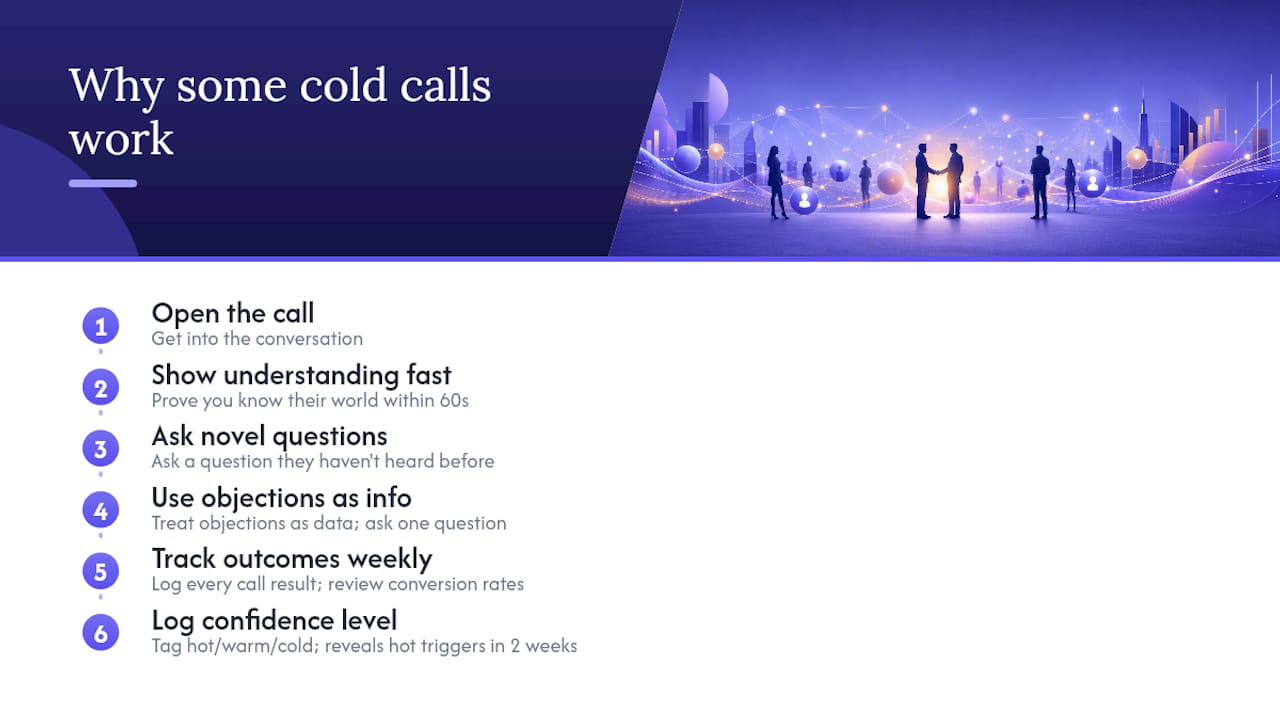
The opener gets you into the conversation. What keeps you there is whether the decision maker believes, within the first 60 seconds, that you understand their world. Not your product. Their world. The reps who consistently book meetings with VPs and C-suite contacts aren't the ones with the cleverest openers. They're the ones who've done enough research to ask a question the decision maker hasn't been asked before.
There's also a tendency in cold-calling playbooks to treat objections as problems to overcome. The better frame is that an objection is information. "Not interested" usually means "you haven't made this relevant yet." "Bad timing" usually means "I don't see this as urgent." Both are solvable with one good question, not a longer pitch.
The tracking piece gets the least attention of all, and it's where the most leverage sits. A rep who logs every call outcome and reviews their conversion rates weekly will outperform a rep who relies on memory and gut feel, even if the second rep is naturally more talented. The data shows you where the system is leaking. Without it, you're guessing.
One small change that produces outsized results: require reps to log a confidence level (hot, warm, cold) on every call outcome. Within two weeks, you'll see which triggers and openers are generating hot outcomes and which are generating cold ones. That single data point reshapes how the team builds its lists and writes its openers faster than any training session.
Sources
The following resources informed this guide and are worth reading for deeper study:
- Cold calling guidelines — ZoomInfo Pipeline
- Cold Calling Guide 2026: The Complete Playbook — QUOTA Training
- Cold calling: definition, scripts, examples and tips — Lead Forensics
- Best Cold Call Techniques That Actually Book Meetings — Alex Berman
- 17 Cold Calling Techniques That Actually Work — DemandNexus